Orbion Yönetici KılavuzuOrbion Admin Guide
Bu kılavuz, Orbion sistemini sıfırdan çalışır hale getirmeniz için gereken tüm yapılandırma adımlarını bağımlılık sırasına göre anlatır. Soldaki menüden bölümlere geçebilir, üstteki kutudan arama yapabilir, EN/TR ile dili değiştirebilirsiniz. This guide walks you through every configuration step needed to bring an Orbion system online, ordered by dependency. Use the left menu to navigate, the box above to search, and EN/TR to switch language.
Giriş ve MimariIntroduction & Architecture
Orbion, mevcut veritabanlarınızın üzerine kod yazmadan uygulama, form, pano ve iş akışı kurmanızı sağlayan bir low-code platformudur. Veri kaynağı bağlarsınız, formlar ve komponentler tasarlarsınız, bunları menüler/portal altında uygulamalara dönüştürürsünüz; iş akışları ve entegrasyonlarla otomatikleştirirsiniz. Orbion is a low-code platform for building apps, forms, dashboards and workflows on top of your existing databases — without writing code. You connect data sources, design forms and components, expose them as apps under menus/portal, then automate with workflows and integrations.
Ana kavramlarCore concepts
| KavramConcept | AçıklamaMeaning |
|---|---|
| Connection | Bir veritabanına bağlantı (PostgreSQL veya SQLite). Tüm veri buradan okunur/yazılır.A database connection (PostgreSQL or SQLite). All data is read/written through it. |
| Form | Bir ekran. İçinde alanlar ve komponentler (tablo, grafik, takvim, ağaç…) bulunur.A screen made of fields and components (table, chart, calendar, tree…). |
| Component | Forma yerleştirilen yapı taşı. Veriye bağlı (table/chart/board/calendar/tree) veya girdi (alanlar) olabilir.A building block placed on a form. Data-bound (table/chart/board/calendar/tree) or input (fields). |
| App / Menu | Formları gruplayan uygulama ve navigasyon. Portal son kullanıcının gördüğü çatıdır.The application and navigation that group forms. Portal is the end-user shell. |
| Workflow | Tetikleyiciyle çalışan otomasyon (kayıt sorgula, döngü, e-posta, onay…).Trigger-based automation (query records, loop, email, approval…). |
Yapılandırma sırasıConfiguration order
Modüller birbirine dayanır; bu sırayla ilerleyin:Modules depend on each other; proceed in this order:
- Connections → veri kaynağı (temel).data sources (foundation).
- Identity → kullanıcı, grup, organizasyon, güvenlik.users, groups, organizations, security.
- Global Variables → ortak parametreler.shared parameters.
- Apps & Menus → uygulama ve navigasyon.application & navigation.
- Forms & Components → ekran tasarımı.screen design.
- Workflows / Integrations / Email → otomasyon ve işletim.automation & operations.
1 · Erişim ve İlk KurulumAccess & First Setup
AmaçPurpose
Yönetim arayüzüne giriş yapıp güvenli bir yönetici hesabıyla başlamak.Sign in to the admin interface and start from a secure administrator account.
AdımlarSteps
- Giriş ekranında (
login.html) yönetici kullanıcı adı/şifresiyle oturum açın.Sign in on the login screen (login.html) with the administrator credentials. - İlk girişte şifrenizi Change Password ekranından değiştirin.On first login, change your password from the Change Password screen.
- Designer (yönetim) arayüzü
index.htmlüzerinden açılır; soldaki bölümler (Connections, Users, Apps…) yönetim modülleridir.The Designer (admin) interface opens atindex.html; the left-hand sections (Connections, Users, Apps…) are the admin modules.
2 · Veri Yönetimi (Data Management)Data Management
Orbion yalnız var olan veritabanlarına bağlanmakla kalmaz; tablo/kolon oluşturup veri de tutabilir. Bu bölüm üç parçadır: Connections (bağlantılar), Veri editörü (tablo/kolon/satır yönetimi) ve Orbion Types (kolonların anlamsal tipleri).Orbion doesn't just connect to existing databases; it can also create tables/columns and store data. This section has three parts: Connections, the Data editor (manage tables/columns/rows), and Orbion Types (the semantic types of columns).
2.1 · Connections (Bağlantılar)2.1 · Connections
Orbion'un veri okuyup yazacağı veritabanlarını tanımlar — tüm sistemin temelidir; form, komponent ve iş akışları bu bağlantılar üzerinden çalışır.Defines the databases Orbion reads from and writes to — the foundation of the whole system; forms, components and workflows all run through these connections.
Desteklenen motorlarSupported engines
PostgreSQL SQLite
| Engine | Ne zamanWhen | Bağlantı bilgisiConnection details |
|---|---|---|
| PostgreSQL | Sunucu tabanlı, çok kullanıcılı, üretim için.Server-based, multi-user, for production. | Host · Port · Database · User · Password · Schema.Host · Port · Database · User · Password · Schema. |
| SQLite | Dosya tabanlı, hafif; küçük/yerel uygulamalar ve hızlı başlangıç için.File-based, lightweight; for small/local apps and quick starts. | Tek bir dosya yolu (host/port/parola yok).A single file path (no host/port/password). |
Alan referansıField reference
| AlanField | ZorunluRequired | AçıklamaDescription |
|---|---|---|
| Name | ✓ | Bağlantının görünen adı; form ve komponentlerde bununla seçilir.Display name; referenced by forms and components. |
| Engine | ✓ | Veritabanı tipi. Yazım/çeviri davranışı buna göre belirlenir.Database type. Drives SQL dialect/translation behavior. |
| Host / Port / Database | ✓ | Sunucu adresi, port ve veritabanı adı.Server address, port and database name. |
| User / Password | ✓ | Kimlik bilgileri (şifre güvenli saklanır).Credentials (password stored securely). |
| Schema | — | Varsayılan şema (Postgres'te genelde public).Default schema (often public in Postgres). |
AdımlarSteps
- Connections bölümünü açın → New.Open Connections → New.
- Motoru ve bağlantı bilgilerini girin.Pick the engine and enter connection details.
- Test ile doğrulayın; başarılıysa Save.Validate with Test; on success Save.
- Şema/tablo keşfi otomatik yapılır; artık formlarda bu bağlantıyı seçebilirsiniz.Schema/table discovery runs automatically; the connection is now selectable in forms.
2.2 · Veri editörü (tablo · kolon · veri)2.2 · Data editor (tables · columns · data)
Bağlandıktan sonra Orbion'un yerleşik veri editörüyle veritabanını doğrudan yönetebilirsiniz: soldaki ağaçta Bağlantı › Şema › Tablo gezinir, ortada bir tablonun kolon yapısını ve verisini (satırları) görürsünüz. Tüm DDL ve CRUD işlemleri buradan yapılır — ayrı bir SQL aracına gerek yoktur.Once connected, Orbion's built-in data editor manages the database directly: browse Connection › Schema › Table in the left tree, and view a table's column structure and data (rows) in the middle. All DDL and CRUD is done here — no separate SQL tool needed.
| İşlemOperation | NasılHow |
|---|---|
| Tablo oluşturCreate table | + Create Table; ad + kolonlar (her kolon: ad · veri tipi · Nullable · PK · Default · Comment). İlk kolon varsayılan id serial PK gelir.+ Create Table; name + columns (each: name · data type · Nullable · PK · Default · Comment). The first column defaults to id serial PK. |
| Kolon ekle / düzenle / silAdd / edit / drop column | + Add Column, satırdaki ✎ (düzenle) veya 🗑 (sil). Veri tipi, nullable, default ve yorum değiştirilebilir.+ Add Column, the row's ✎ (edit) or 🗑 (drop). Data type, nullable, default and comment can change. |
| Satır ekle/düzenle/sil (CRUD)Row CRUD | + New Row ile ekleyin; bir satıra tıklayıp düzenleyin veya silin.Add with + New Row; click a row to edit or delete. |
| View | Salt-okunur sorgu görünümü oluşturun (normal veya materialized).Create a read-only query view (normal or materialized). |
2.3 · Orbion Types (anlamsal kolon tipleri)2.3 · Orbion Types (semantic column types)
Orbion Type, bir kolonun fiziksel veritabanı tipinin üzerine konan anlamsal tiptir. Veritabanı varchar, int, timestamp bilir; Orbion ise o kolonun ne ifade ettiğini bilmek ister — bir kullanıcı mı, bir tarih mi, bir açılır seçenek mi? Orbion Type bunu söyler ve kolonun tüm formlarda nasıl render edileceğini ve davranacağını belirler. Her kolona fiziksel tipinden otomatik bir varsayılan atanır; siz bunu override edebilirsiniz (yalnız değişiklik saklanır, varsayılan yeniden hesaplanır).Orbion Type is the semantic type layered on top of a column's physical database type. The database knows varchar, int, timestamp; Orbion wants to know what the column means — a user, a date, a dropdown option? Orbion Type says so, and drives how the column renders and behaves across all forms. Each column gets an auto-derived default from its physical type, which you can override (only the override is stored; the default is recomputed).
status kolonu Option'a alınıp bir Global Variable'a (Issue Status) bağlanmış; assignee User; due_date otomatik Date; id Sequence Id.In the column inspector each column has an Orbion Type picker. The status column is set to Option and linked to a Global Variable (Issue Status); assignee is User; due_date auto Date; id Sequence Id.| Orbion Type | Anlamı / davranışıMeaning / behavior |
|---|---|
| Text | Düz metin (char/text/uuid/bool → otomatik Text).Plain text (char/text/uuid/bool → auto Text). |
| Number | Sayısal (int/numeric/decimal/serial → otomatik Number).Numeric (int/numeric/decimal/serial → auto Number). |
| Date | Tarih/zaman (timestamp/date/time → otomatik Date).Date/time (timestamp/date/time → auto Date). |
| Sequence Id | Otomatik artan anahtar (kod/numara üretimi; entegrasyon sequence'leriyle uyumlu).Auto-incrementing key (code/number generation; aligns with integration sequences). |
| User | Bir kullanıcıya işaret eder → formda kullanıcı seçici ve kullanıcı bilgisi (ad/e-posta) açığa çıkar.Points to a user → exposes a user picker and user attributes (name/email) on the form. |
| Group | Bir gruba işaret eder → grup seçici.Points to a group → a group picker. |
| Org | Bir organizasyona/şirkete işaret eder → organizasyon seçici.Points to an organization/company → an org picker. |
| Option | Açılır seçenek → değerleri bir Global Variable'dan gelir (aşağıda).A dropdown option → values come from a Global Variable (below). |
2.4 · Option tipi ↔ Global Variable eşleştirme2.4 · Option type ↔ Global Variable matching
Bir kolonun Orbion Type'ı Option yapıldığında, yanında bir Global Variable seçici belirir. Seçtiğiniz GV o kolonun açılır liste kaynağı olur: kolon, bu GV'nin key/label değerleriyle her formda otomatik bir dropdown olarak görünür — alanı tek tek her formda yapılandırmanıza gerek kalmaz. Böylece veri katmanındaki anlam (Option + GV) doğrudan arayüze taşınır.When a column's Orbion Type is set to Option, a Global Variable picker appears next to it. The GV you choose becomes the column's dropdown source: the column shows up as an automatic dropdown in every form using this GV's key/label — no need to configure the field per form. The meaning defined at the data layer (Option + GV) flows straight to the UI.
optionGvId → Global Variable (Bölüm 4). GV'nin Column'u key'i, Label Column'u görünen adı verir; Parent Column varsa cascade çalışır. Form alanında ek bir şey yapmazsanız bile, bu kolon doğru dropdown'ı gösterir.Column (Option) → optionGvId → Global Variable (Section 4). The GV's Column gives the key, its Label Column the shown name; if it has a Parent Column, cascade works. Even with no extra form-field setup, this column renders the right dropdown.AdımlarSteps
- Connections'ta bir PostgreSQL veya SQLite bağlantısı açın (Test → Save).Create a PostgreSQL or SQLite connection in Connections (Test → Save).
- Veri editöründe tabloyu oluşturun/kolonları ekleyin ve verinizi girin.In the Data editor create the table/add columns and enter your data.
- Her kolona doğru Orbion Type'ı verin (User/Date/Option…).Set the right Orbion Type per column (User/Date/Option…).
- Option kolonlarını bir Global Variable'a bağlayın (Bölüm 4); artık o alan tüm formlarda dropdown olarak gelir.Link Option columns to a Global Variable (Section 4); the field now appears as a dropdown across all forms.
3 · Kimlik ve YetkiIdentity & Access
Amaç ve erişim modeliPurpose & access model
Bu modül kimlerin giriş yapacağını, hangi gruplara/organizasyonlara ait olduklarını ve neyi görüp düzenleyebileceklerini belirler. Üç ana ekran vardır: Users (kullanıcılar), Groups (gruplar) ve Companies (organizasyon/şirket). Erişim bu üçünün birleşiminden doğar:This module defines who can sign in, which groups/organizations they belong to, and what they can see and edit. There are three main screens: Users, Groups and Companies (organization). Access emerges from the combination of all three:
Kullanıcılar (Users)Users
Bir kullanıcının düzenleyicisi üç sekmeden oluşur: General, Security, Custom Fields. Üstte avatar, ad, @loginName, rol rozeti ve durum görünür.A user's editor has three tabs: General, Security, Custom Fields. The header shows the avatar, name, @loginName, a role badge and the status.
General sekmesi — kimlik alanlarıGeneral tab — identity fields
| AlanField | AnlamMeaning |
|---|---|
| First / Last name | Ad ve soyad (avatar baş harflerini de besler).First and last name (also feeds the avatar initials). |
| Login name | Giriş kullanıcı adı (@). Sistem kullanıcılarında kilitlidir.The sign-in username (@). Locked for system users. |
| Email · Phone · Mobile | İletişim bilgileri; e-posta bildirim/şablonlarda kullanılır.Contact details; email is used by notifications/templates. |
| Company · Department | Organizasyon ataması (Departman, seçili şirkete göre süzülür).Organization assignment (Department is filtered by the chosen company). |
| Manager | Üst yönetici — org şeması ve onay akışlarında kullanılır.The line manager — used in the org chart and approval flows. |
| Language · Timezone | Kullanıcının dil ve saat dilimi tercihi.The user's language and timezone preference. |
| Title · Description · Tags | Ünvan, not ve etiketler (serbest sınıflandırma).Title, note and tags (free classification). |
Custom FieldsCustom Fields
Yöneticinin tanımladığı ek kullanıcı alanları (text/number/date/select/boolean). Manage Definitions ile alanlar tanımlanır; her kullanıcıda doldurulur.Admin-defined extra user fields (text/number/date/select/boolean). Define them via Manage Definitions; fill them per user.
Self-Registration (Public Signup)Self-Registration (Public Signup)
Kullanıcıların kendi kendine kayıt olabileceği herkese açık bir kayıt komponentidir; web sayfasına gömülebilir ve kaydı tamamlayınca Orbion'da bir kullanıcı oluşturur. Yeni kullanıcının organizasyonu, grubu ve başlangıç durumu Designer'da sabitlenir ve sunucuda zorlanır. Kayıt sonrası davranış form Rules ile yönetilir: onSaveSuccess / onSaveError (yönlendirme, mesaj, e-posta).A public registration component where users sign themselves up; embeddable on a web page, it creates a user in Orbion on completion. The new user's organization, group and initial status are configured in the Designer and enforced server-side. Post-signup behavior is handled by form Rules: onSaveSuccess / onSaveError (redirect, message, email).
Organization Form (org bilgisi yarat / düzenle)Organization Form (create / edit org info)
Signup'ın kardeşi bir kompozit form komponentidir. Bir organizasyonun resmi bilgilerini (Firma Adı*, Kısa Ad*, Vergi No, Telefon, E-posta, Web, Adres) ve değiştirilebilir logosunu yarat/düzenle ekranı sağlar. Durum (Status) kullanıcıya gösterilmez; bir özellikten ayarlanır. Erişim sahip-yetkilidir (admin, org sahibi veya o org'un üyesi).A composite form component, sibling of Signup. It provides a create/edit screen for an organization's official info (Company Name*, Short Name*, Tax ID, Phone, Email, Website, Address) and an editable logo. Status is not shown to the user; it is set from a property. Access is owner-authorized (admin, the org owner, or a member of that org).
| ModMode | AnlamMeaning |
|---|---|
| current (varsayılan)(default) | Giriş yapan kullanıcının kendi organizasyonunu düzenler.Edits the signed-in user's own organization. |
| param | Bir id parametresiyle (örn. navigate token) gelen organizasyonu düzenler.Edits the organization passed by an id parameter (e.g., a navigate token). |
| new | Boş formla yeni bir organizasyon oluşturur; isteğe bağlı olarak org üyelerine açılacak portal uygulamaları seçilebilir.Creates a new organization from a blank form; optionally selects the portal apps the org's members will see. |
Gruplar ve App AtamasıGroups & app assignment
Grup, kullanıcıları toplayan ve onlara hem yetenek hem uygulama erişimi dağıtan birimdir. Dört sekmesi vardır: General (ad, renk, açıklama), Members (üye ekle/çıkar), Capabilities (üyelerin otomatik miras aldığı yetenekler) ve Portal Apps (üyelerin portalda göreceği uygulamalar).A group gathers users and distributes both capabilities and app access to them. It has four tabs: General (name, color, description), Members (add/remove users), Capabilities (caps members inherit automatically), and Portal Apps (the apps members see in the portal).
Yetenekler (Capabilities)Capabilities
Yetenekler, izinleri etiketleyen serbest anahtarlardır (ör. isadmin, premium, reports). Kullanıcıya doğrudan verilebilir ya da bir grup üzerinden miras alınır; ikisinin birleşimi Effective (etkin) yeteneklerdir. Kurallar, sorgular ve görünürlük koşullarında "kullanıcının şu yeteneği var mı?" diye sınanır (Bölüm 6.11–6.12).Capabilities are free permission tags (e.g. isadmin, premium, reports). They can be granted directly to a user or inherited via a group; their union is the Effective set. Rules, queries and visibility conditions test "does the user have this capability?" (Sections 6.11–6.12).
Organizasyon (Companies)Organization (Companies)
Companies ekranı şirket ve departman hiyerarşisini tutar. Her kullanıcı bir şirket + departman'a ve bir yöneticiye bağlanır; bu, organizasyon şemasını ve veri kapsamını oluşturur.The Companies screen holds the company and department hierarchy. Each user is linked to a company + department and a manager; this builds the org chart and data scope.
- Company — ad, kısa ad (shortName), vergi no, logo vb.Company — name, short name, tax id, logo, etc.
- Department — şirket içinde alt birimler; iç içe (parent) olabilir. Kullanıcı şirketi seçilince departman listesi süzülür.Department — sub-units within a company; can be nested (parent). Selecting a user's company filters the department list.
- Manager — kullanıcının üstü; onay akışlarında
{{user.manager}}olarak da kullanılır.Manager — the user's superior; also used as{{user.manager}}in approval flows.
Şifre & güvenlik işlemleriPassword & security operations
| İşlemOperation | AçıklamaDescription |
|---|---|
| Parola atamaSet password | Yeni kullanıcıda Security sekmesinde ilk parola girilir; parolalar güvenli (hash'li) saklanır, düz metin geri alınamaz.On a new user, the initial password is set on the Security tab; passwords are stored hashed and the plain text is not retrievable. |
| 🔑 Change Password | Mevcut kullanıcıda parolayı sıfırlama (modal). İsteğe bağlı, kullanıcıya e-posta şablonuyla bildirilebilir ({{tempPassword}}, Bölüm 9).Reset an existing user's password (modal). Optionally notified via an email template ({{tempPassword}}, Section 9). |
| İlk girişte değiştirForce change on next login | Kullanıcı bir sonraki girişte parolasını değiştirmeye zorlanır.The user is forced to change the password at next sign-in. |
| Status | Active (giriş açık) · Passive (devre dışı) · Locked (kilitli — örn. çok sayıda hatalı giriş).Active (can sign in) · Passive (disabled) · Locked (e.g. after too many failed logins). |
| Last Login · Failed Logins | Salt-okunur izleme: son giriş zamanı ve başarısız deneme sayısı.Read-only tracking: last sign-in time and failed-attempt count. |
Kurulum sırasıSetup order
- Companies: şirket ve departman yapısını oluşturun.Companies: build the company and department structure.
- Groups: rol/ekip gruplarını açın; Capabilities ve Portal Apps'i atayın.Groups: create role/team groups; assign Capabilities and Portal Apps.
- Users: hesapları açın (rol, durum, parola), şirket/departman/yönetici ve grup üyeliklerini verin.Users: create accounts (role, status, password), set company/department/manager and group memberships.
- App içindeki menü/form erişimini allowedGroups ile inceltin (Bölüm 5–6).Refine menu/form access inside apps via allowedGroups (Sections 5–6).
4 · Global DeğişkenlerGlobal Variables
Global Variable nedir?What is a Global Variable?
Bir Global Variable, bir veritabanı kolonunun değerlerini tüm formlar ve filtreler arasında paylaşılan, önbelleğe alınmış (cached) bir listeye dönüştürür. Açılır listeleri (combobox/filtre) tek bir merkezi kaynaktan beslersiniz: kolonu bir kez tanımlarsınız, her formda tekrar tekrar sorgu yazmazsınız. Üst çubuktaki ⚡ Global Variables düğmesinden yönetilir.A Global Variable turns the values of a database column into a shared, cached list across all forms and filters. You feed dropdowns (combobox/filter) from one central source: define the column once instead of rewriting queries in every form. Managed from the ⚡ Global Variables button in the top bar.
Key / Value (saklanan vs görünen)Key / Value (stored vs shown)
İki kolon ayrımı kritiktir:The two-column distinction is key:
| AlanField | RolüRole |
|---|---|
| Column (zorunlu) | Key — kayda yazılan/sorgulanan değer (ör. city_code = 34).Key — the value stored/queried in the record (e.g. city_code = 34). |
| Label Column (opsiyonel) | Görünen etiket — listede gösterilen ad (ör. city_name = "İstanbul"). Boşsa Column'un kendisi gösterilir.Display label — the name shown in the list (e.g. city_name = "Istanbul"). If blank, the Column itself is shown. |
34) yazılır. Ad değişse bile anahtar sabit kalır.The user sees a readable name ("Istanbul"), but a short/stable key (34) is written to the database. The key stays stable even if the name changes.Önbellekleme (Caching)Caching
Global Variable'lar form başına değil, veri-kaynağı seviyesinde (connection · schema · table · column) önbelleğe alınır — aynı kolonu kullanan tüm filtreler tek bir önbellek girdisini paylaşır. Bu, açılır listeleri her açılışta yeniden sorgulamadan hızlı tutar.Global Variables are cached at the data-source level (connection · schema · table · column), not per form — all filters using the same column share one cache entry. This keeps dropdowns fast without re-querying on every open.
Bağımlı (Cascading) listelerCascading (dependent) lists
Bir Global Variable'a Parent Column (FK) verirseniz, onu kullanan alan/filtre başka bir alanın seçimine göre süzülebilir. Tüketim tarafında alt liste, üst seçime Depends On ile bağlanır. Klasik örnek: Ülke → Şehir → İlçe.If you give a Global Variable a Parent Column (FK), a field/filter using it can be filtered by another field's selection. On the consuming side, the child list is bound to the parent via Depends On. Classic example: Country → City → District.
city_id) tanımlanır; formda alt alan Depends On ile üst alana (Şehir) bağlanır. Üstte İstanbul seçilince alt liste yalnız o şehrin ilçelerini gösterir.Cascade: define a Parent Column on the GV (e.g. city_id); on the form, bind the child field to the parent (City) via Depends On. Picking Istanbul filters the child list to that city's districts.Kullanım — bir GV'yi alana bağlamakUsage — binding a GV to a field
- Combobox / List alanı: alanın veri kaynağını (dataLink) Variable yapın ve listeden Global Variable'ı seçin. Seçeneklerin key/label'ı GV'den gelir (Bölüm 6.2).Combobox / List field: set the field's data source (dataLink) to Variable and pick the Global Variable. The options' key/label come from the GV (Section 6.2).
- Filtre: filtre değerini bir GV'den seçtirin; bağımlıysa Depends On ile üst filtreye bağlayın.Filter: source the filter value from a GV; if dependent, bind it to the parent filter via Depends On.
AdımlarSteps
- ⚡ Global Variables → + Add Variable; ad verin.⚡ Global Variables → + Add Variable; name it.
- Connection → Schema → Table → Column seçin; gerekiyorsa Label Column ve Parent Column ekleyin.Pick Connection → Schema → Table → Column; add Label Column and Parent Column if needed.
- Fetch Mode (Cached/Live) ve TTL'i ayarlayıp Enabled ile kaydedin.Set Fetch Mode (Cached/Live) and TTL, keep it Enabled, and save.
- Bir combobox alanında kaynağı Variable seçip bu GV'yi bağlayın; cascade için Depends On verin. Değişiklik sonrası ↻ Refresh ile önbelleği tazeleyin.On a combobox field, set source to Variable and bind this GV; add Depends On for cascade. After changes, ↻ Refresh the cache.
5 · Uygulamalar ve Menüler (Apps)Apps & Menus
Amaç — her şeyin birleştiği yerPurpose — where it all comes together
Bir App (uygulama), tüm yapı taşlarını — formlar, sorgu presetleri, gruplar — son kullanıcının kullandığı tek bir ürüne dönüştürdüğünüz yerdir. Buraya kadar tasarladığınız formları menüler altında düzenler, her menü öğesine bir form + (opsiyonel) preset bağlar, erişimi gruplara açar, görünümü (ikon/renk/tema/menü konumu) belirler ve portal üzerinden yayınlarsınız. Yapı üç katmanlıdır: App → Module → Menu item.An App is where you turn all the building blocks — forms, query presets, groups — into one product the end user actually uses. You arrange the forms you designed under menus, link each menu item to a form + (optional) preset, open access to groups, set the look (icon/color/theme/menu position) and publish via the portal. The structure is three layers: App → Module → Menu item.
5.1 · Uygulama oluşturma5.1 · Creating an app
+ New App ile bir uygulama açarsınız. Ayarlar uygulamanın kimliğini ve portaldaki görünümünü belirler:+ New App creates an application. Its settings define the app's identity and portal look:
| AyarSetting | AnlamMeaning |
|---|---|
| Icon · Color | Uygulamanın listede ve portalda görünen simgesi ve rengi.The app's icon and color shown in the list and portal. |
| Name · Description | Uygulama adı ve kısa açıklaması.Application name and a short description. |
| Appearance (Theme) | Portal teması: Dark · Light · System.Portal theme: Dark · Light · System. |
| Public Access | Açıkken uygulama grup izni gerektirmeden açılır (herkese açık).When on, the app opens without group permissions (public). |
| Show Record Counts | Menü öğelerinin yanında eşleşen kayıt sayısı rozeti.A badge of matching record count next to menu items. |
| Menu Position | Navigasyon sol kenar çubuğunda mı yoksa üst yatay barda mı.Navigation on the left sidebar or a top horizontal bar. |
| Launch URL | Otomatik üretilen çalıştırma bağlantısı (kopyalanıp paylaşılır).An auto-generated run link (copy & share). |
5.2 · Modüller (menü grupları)5.2 · Modules (menu groups)
Modüller, menü öğelerini gruplayan başlıklardır (portal menüsünde bölüm başlığı gibi). + Add Module ile eklenir.Modules are headings that group menu items (like a section header in the portal menu). Add via + Add Module.
| AyarSetting | AnlamMeaning |
|---|---|
| Name · Icon | Modül başlığı ve simgesi.Module heading and icon. |
| Default | Uygulama açılınca öne çıkan modül (yalnız biri).The module featured when the app opens (only one). |
| Collapsible | Menüde kapalı (daraltılmış) başlar.Starts collapsed in the menu. |
| Group Access | Modülü görebilecek gruplar (boş = herkes).Groups that can see the module (empty = everyone). |
5.3 · Menü öğeleri (form bağlama)5.3 · Menu items (linking forms)
Her menü öğesi bir form tasarımını menüye getirir. + Add Form ile eklenir; formu, başlığını, presetini ve erişimini burada belirlersiniz.Each menu item brings a form design into the menu. Add via + Add Form; here you set the form, its title, preset and access.
| AlanField | AçıklamaDescription |
|---|---|
| Form Design * | Bu öğenin açacağı form tasarımı (Bölüm 6).The form design this item opens (Section 6). |
| Menu Label | Menüde görünen ad (boşsa form adı).The name shown in the menu (defaults to form name). |
| Form Title | Açıldığında üst çubukta görünen başlık.The title shown in the toolbar when opened. |
| Query Preset | Açılışta uygulanan filtre: — tüm satırlar —, Approval (Waiting/Approved/Rejected/All) veya kayıtlı bir preset (Bölüm 6.12).A filter applied on open: — all rows —, Approval (Waiting/Approved/Rejected/All), or a saved preset (Section 6.12). |
| Default | Modül/uygulama açılınca gelen ekran.The screen shown when the module/app opens. |
| Count badge | Menüde eşleşen kayıt sayısı rozeti.A matching-record-count badge in the menu. |
| Group Access | Bu öğeyi görebilecek gruplar (boş = herkes).Groups that may see this item (empty = everyone). |
5.4 · Sıralama, erişim ve portal sonucu5.4 · Ordering, access & the portal result
Modülleri ve menü öğelerini ↑↓ ile sıralarsınız; bu sıra portalda birebir görünür. Erişim iki katmanlıdır: uygulamaya girme grubun Portal Apps'inden (Bölüm 3), uygulama içindeki her modül/öğenin görünmesi Group Access (allowedGroups)'tan gelir. Sonuç, son kullanıcının gördüğü portaldır:You order modules and menu items with ↑↓; that order shows verbatim in the portal. Access is two layers: reaching the app comes from the group's Portal Apps (Section 3), and each module/item's visibility comes from Group Access (allowedGroups). The result is the portal the end user sees:
AdımlarSteps
- Apps → + New App: ikon/renk/ad, tema, public access ve menü konumunu ayarlayın.Apps → + New App: set icon/color/name, theme, public access and menu position.
- + Add Module ile menü gruplarını oluşturun (biri DEFAULT).Create menu groups with + Add Module (one DEFAULT).
- Her modüle + Add Form ile menü öğeleri ekleyin: form + (preset) + başlık + grup erişimi. Aynı formu farklı presetlerle çoğaltın.Add menu items to each module via + Add Form: form + (preset) + title + group access. Reuse a form with different presets.
- ↑↓ ile sırayı ve DEFAULT açılış ekranını ayarlayın.Set order with ↑↓ and the DEFAULT landing screen.
- Grubun Portal Apps'ine ekleyip (Bölüm 3) Launch URL'den portalı test edin.Add it to a group's Portal Apps (Section 3) and test the portal from the Launch URL.
5.5 · App Export / Import (Taşınabilirlik)App Export / Import (Portability)
Bir uygulamayı tüm bağımlılıklarıyla (formlar, query'ler, global değişkenler, menü yapısı) tek bir paket olarak dışa aktarıp başka bir ortama (örn. Geliştirme → Üretim) taşıyabilirsiniz.Export an app with all its dependencies (forms, queries, global variables, menu structure) as a single package and move it to another environment (e.g., Dev → Prod).
Neden gerekli — mantığı. Bir uygulama tek bir nesne değildir; birbirine iç id'lerle bağlı bir nesne ağıdır (form → query → global değişken → menü). Tek bir formu elle kopyalamak bağımlılıklarını geride bırakır ve id'ler ortamdan ortama farklı olduğu için referanslar kırılır. Export/Import bu sorunu dört adımda çözer:Why it matters — the logic. An app is not a single object; it is a graph of objects linked by internal ids (form → query → global variable → menu). Copying one form by hand leaves its dependencies behind, and because ids differ between environments the references break. Export/Import solves this in four steps:
- Kapanış (closure) toplama — uygulamadan erişilen tüm formlar, query'ler ve GV'ler bir JSON ağacında toplanır; hiçbir bağımlılık dışarıda kalmaz.Collect the closure — every form, query and GV reachable from the app is gathered into one JSON tree; no dependency is left out.
- Origin damgası — her nesne kaynak kimliğiyle (originId) damgalanır; böylece "aynı mantıksal nesne" iki ortamda da tanınır.Origin stamp — each object is stamped with its source identity (originId), so the "same logical object" is recognized in both environments.
- Referans yeniden yazımı — import'ta iç id referansları hedef ortamın yeni id'lerine yeniden bağlanır; ağ kırılmadan kurulur.Reference rewrite — on import, internal id references are rebound to the target's new ids; the graph is rebuilt intact.
- Idempotent yükleme — ikinci import aynı originId'leri günceller, yeni nesneleri ekler. Yani Dev → Prod terfisi tekrarlanabilirdir.Idempotent load — a second import updates the same originIds and adds new objects. So Dev → Prod promotion is repeatable.
| KavramConcept | AnlamMeaning |
|---|---|
| Export paketiExport package | Uygulamanın kapanışı (closure): bağlı tüm formlar, query'ler ve GV'ler JSON ağacı olarak toplanır.The app's closure: all linked forms, queries and GVs are gathered as a JSON tree. |
| Origin damgasıOrigin stamp | Her nesne kaynak ortam kimliğiyle (originId) damgalanır; tekrar import'ta eşleştirme/güncelleme buna göre yapılır.Each object is stamped with its source identity (originId); re-import matches/updates accordingly. |
| Referans yeniden yazımıReference rewrite | Import sırasında iç referanslar (form↔query↔GV id'leri) hedef ortamdaki yeni id'lere yeniden bağlanır.On import, internal references (form↔query↔GV ids) are rewritten to the target environment's new ids. |
| Bağlantı haritasıConnection map | Veritabanı bağlantıları şifresiz taşınır; hedefte ad bazında eşlenir, şifreler orada güvenle girilir.Database connections move without passwords; matched by name in the target, where passwords are entered securely. |
İçe aktarma sihirbazı — Analyze · Apply · Revert. Import üç adımda ilerler: Analyze paketi hedefle karşılaştırır ve her nesne için yeni / mevcut durumunu, bağlantı ve grup eşleştirme ihtiyacını bir fark (diff) olarak gösterir; Apply kararları uygular ve öncesinde otomatik bir yedek (pre-import) alır; bir şey ters giderse Revert (↩ Undo) ile import tek tıkla geri alınır. İçe aktarma yedekleri, Yedekleme ekranında (Bölüm 10) da görünür.Import wizard — Analyze · Apply · Revert. Import runs in three steps: Analyze compares the package with the target and shows, as a diff, each object's new / exists state plus any connection and group mapping needed; Apply commits the decisions and first takes an automatic pre-import backup; if anything goes wrong, Revert (↩ Undo) rolls the import back in one click. Import backups also appear on the Backups screen (Section 10).
Veritabanı hazırlama & motorlar arası taşıma. Import yalnız tanımı değil, gerektiğinde veritabanını ve tabloları da hazırlayabilir: hedefte eksik tablolar oluşturulur ve lookup (liste) tablolarının verisi (combobox/GV kaynakları) tohumlanır. Bağlantı eşlemesinde hedef motor (engine) seçilebilir; böylece bir uygulama PostgreSQL ↔ SQLite arasında taşınabilir — şema adları (PostgreSQL public ↔ SQLite main) ve tablolar otomatik uyarlanır. Hangi lookup verisinin taşınacağı export sırasında seçilir; mevcut tabloların verisi üzerine yazılmaz (yalnız boşsa tohumlanır).Database provisioning & cross-engine migration. Import can prepare not only the definition but, when needed, the database and tables too: missing tables are created in the target and lookup-table data (combobox/GV sources) is seeded. In connection mapping you can pick the target engine, so an app can move PostgreSQL ↔ SQLite — schema names (PostgreSQL public ↔ SQLite main) and tables are adapted automatically. Which lookup data travels is chosen during export; existing table data is never overwritten (seeded only when empty).
5.6 · App erişim linkleri & gömülü LoginApp access links & embedded Login
Bir uygulamaya portalı atlayarak doğrudan erişen token'lı bağlantılar üretebilirsiniz. Token geçerliyse kullanıcı doğrudan uygulamada açılır; değilse uygulamanın içine gömülü Login Form komponenti devreye girer.Generate token-based links that open an app directly, bypassing the portal. If the token is valid the user lands straight in the app; otherwise the embedded Login Form component takes over.
Nedir, neden — mantığı. Normalde kullanıcı bir uygulamaya portal üzerinden, merkezi girişten sonra ulaşır. Bazen ise bir kişiye (çoğu kez dış kullanıcıya) tüm portalı açmadan tek bir uygulamaya doğrudan bağlantı vermek istersiniz: bir başvuru formu, bir müşteri portalı vb. Erişim linki bunu bir token ile yapar. Mantık şudur: link açıldığında token geçerliyse kullanıcı doğrudan o uygulamaya düşer; değilse (süresi dolmuş ya da yok) merkezi giriş sayfasına yönlendirmek yerine, uygulamanın içindeki gömülü Login Form kimlik bilgisini toplar. Her iki durumda da oturum o tek uygulamaya sabitlenir (App Scope); kullanıcı başka uygulamalara geçemez. Yetki (token + grup izinleri) sunucuda doğrulanır; çıkışta (logout) scope temizlenir ve gömülü girişe dönülür.What it is, why — the logic. Normally a user reaches an app through the portal after a central sign-in. Sometimes you want to give someone (often an external user) a direct link to a single app — an application form, a customer portal — without exposing the whole portal. An access link does this with a token. The logic: when the link opens, if the token is valid the user drops straight into that app; if not (expired or none), instead of redirecting to the central login page, the embedded Login Form inside the app collects credentials. In both cases the session is hard-scoped to that one app (App Scope); the user cannot reach other apps. Authorization (token + group permissions) is verified server-side; on logout the scope is cleared and the user returns to the embedded login.
| ÖğeItem | AnlamMeaning |
|---|---|
| Token'lı linkToken link | Uygulamaya portal-bypass doğrudan giriş bağlantısı; e-posta/QR ile paylaşılır.A portal-bypass direct entry link to the app; shared by email/QR. |
| Login Form | Uygulama içine gömülen yekpare giriş komponenti (ayrı login sayfasına gitmeden).A self-contained sign-in component embedded inside the app (no separate login page). |
| App Scope | Oturum yalnızca o uygulamaya sabitlenir (hard-scope); kullanıcı başka uygulamalara geçemez.The session is hard-scoped to that app; the user cannot reach other apps. |
| YetkiAuthorization | Token + grup izinleri sunucuda doğrulanır; yetkisiz erişim reddedilir. Çıkış (logout) scope'lu bağlamı temizler.Token + group permissions are verified server-side; unauthorized access is denied. Logout clears the scoped context. |
6 · Formlar ve DesignerForms & Designer
AmaçPurpose
Veriyi gösteren ve düzenleten ekranlar tasarlamak. Designer; sol palet (komponentler), orta tuval (yerleşim) ve sağ özellik panelinden oluşur.Design the screens that display and edit data. The Designer has a left palette (components), a center canvas (layout) and a right properties panel.
Form temelleriForm basics
- Data source — formun ana bağlantı + tablosu. Komponentler bunu miras alır.the form's connection + table. Components inherit it.
- Layout — 12 kolonluk ızgara; her komponentin width ve order'ı vardır.a 12-column grid; each component has a width and order.
- Rules & buttons — koşullu görünürlük, validasyon ve aksiyon butonları.conditional visibility, validation, and action buttons.
Design ve Live modlarıDesign & Live modes
Designer'ın üst çubuğunda iki mod düğmesi vardır: ◳ Design ve ▶ Live. Aynı formu iki açıdan görürsünüz — biri kurguladığınız, diğeri son kullanıcının gördüğü hâl.The Designer's top bar has two mode buttons: ◳ Design and ▶ Live. You see the same form from two angles — the one you build, and the one your end user sees.
- ◳ Design — kurgu tuvali. Komponentleri sürükler, 12-kolon ızgaraya yerleştirir, sağ panelden veri/görünüm/link, kural ve butonlarını ayarlarsınız. Tabloyu, grafiği, takvimi burada temsilî yer-tutucu (placeholder) olarak görürsünüz — gerçek veri çekilmez, yalnızca yerleşim ve yapı.the design canvas. You drag components onto the 12-column grid and configure their data/appearance/link, rules and buttons from the right panel. Data components (table, chart, calendar) appear as placeholders here — no real data is queried, only layout and structure.
- ▶ Live — canlı önizleme. Kaydedilmiş formu, portalda son kullanıcının gördüğüyle birebir aynı şekilde gömülü bir çerçevede render eder: gerçek veri, gerçek komponentler, tıklanabilir/çalışır hâlde. Yaptığınız tasarımı yayına almadan burada görürsünüz.the live preview. It renders the saved form in an embedded frame exactly as the end user sees it in the portal: real data, real components, fully interactive. You see your design as it will actually run — before publishing.
run.html) gibi çizdiği için gerçek veri, kurallar ve butonlar burada test edilir.Live shows the saved form — it renders your last save just like the portal. Unsaved changes won't appear in Live; Save first, then switch to ▶ Live. Because Live draws the form exactly as the runtime (run.html) does, real data, rules and buttons are what you test here.6.1 · Komponent listesi (özet)Component overview
| KomponentComponent | KullanımUse |
|---|---|
| Field (text, number, date, combobox, picker…) | Tekil veri girişi/gösterimi.Single data entry/display. |
| Table | Satır listesi; arama, sıralama, sayfalama, satır seçimi.Row list; search, sort, paging, row selection. |
| Chart (bar, line, area, pie, donut, number, gantt) | Toplulaştırılmış görselleştirme; drill-through.Aggregated visualization; drill-through. |
| Board | Kanban; sürükle-bırak ile durum değişimi.Kanban; drag-drop status change. |
| Calendar | Zaman ekseni; aylık/haftalık/günlük, spanning bar. DetayTime axis; month/week/day, spanning bars. Details |
| Tree | Kendine-referanslı hiyerarşi. DetaySelf-referencing hierarchy. Details |
| Viewer (PDF, Office, image, video, audio, MD, HTML, code) | Dosya/içerik gösterimi.File/content display. |
| Panel / Tab | Diğer komponentleri gruplayan kapsayıcılar.Containers that group other components. |
Sürükle-bırak yerleştirme. Designer'da komponentler sürükle-bırak ile yerleştirilip yeniden sıralanır: paletten canvas'a bırakma, mevcut komponentleri yeniden sıralama, bir paneli içine/dışına taşıma; seçili komponenti Delete ile silme, Ctrl+D ile çoğaltma.Drag-and-drop placement. In the Designer, components are placed and reordered by drag-and-drop: drop from the palette onto the canvas, reorder existing components, move into/out of a panel; delete the selected component with Delete, duplicate with Ctrl+D.
6.2 · Alan komponentleri (Fields)Field components
Amaç: Tekil veri girişi/gösterimi. Her alanın Field Name'i formun tablosundaki bir kolona karşılık gelir; kaydedince o kolona yazılır.Purpose: Single value entry/display. Each field's Field Name maps to a column in the form's table and is written back on save.
Her alanda ortak özelliklerProperties common to all fields
| ÖzellikProperty | AçıklamaDescription |
|---|---|
| Field Name | Yazılacak DB kolonu.The DB column to write. |
| Label / Hide label | Etiket metni / etiketi gizle.Label text / hide the label. |
| Required | Zorunlu (Rules ile dinamik de yapılabilir).Mandatory (can be made dynamic via Rules). |
| Read-only / Disabled | Salt-okunur.Read-only. |
| Default value | Açılışta varsayılan (sabit, Now, Current User…).Default on open (fixed, Now, Current User…). |
| Placeholder / Help text | İpucu metinleri.Hint texts. |
| Width | 12-kolon ızgaradaki genişlik.Width on the 12-column grid. |
| Visibility | Rules ile koşullu göster/gizle/aktif et (Bölüm 6.11).Conditional show/hide/enable via Rules (Section 6.11). |
{{Label}} token'ı, onChange tetikleyici, Field koşulu, Set Field hedefi ve Limit Values listelerinde Label'ı ile çıkar. Tipik kullanım: bir hesaba/aramaya/AI görevine besleyeceğiniz ama tabloya yazmak istemediğiniz değer.
A field whose Field Name is empty (or doesn't match a column of the form's table) is unbound: it is shown and editable but not saved — it acts as a temporary form variable. An unbound field is referenced by its Label: it appears by Label in rule {{Label}} tokens, the onChange trigger, a Field condition, a Set Field target and Limit Values lists. Typical use: a value you feed into a calculation/search/AI task but don't want written to the table.Alan tipleriField types
| TipType | KullanımUse |
|---|---|
| Text | Tek satır metin.Single-line text. |
| Textarea / Rich text | Çok satır / biçimli metin (toolbar, büyüt/küçült).Multi-line / formatted text (toolbar, maximize). |
| Number | Sayısal; blur'da biçimlendirme.Numeric; display formatting on blur. |
| Date | Mod: date, datetime, datetime-seconds, time.Mode: date, datetime, datetime-seconds, time. |
| Checkbox | Boolean.Boolean. |
| Combobox / List | Açılır seçim. Kaynak: DB sorgusu, Global Variable veya statik. Arama açılabilir.Dropdown. Source: DB query, Global Variable or static. Optional search. |
| Org / Group / User picker | Organizasyon, grup veya kullanıcı seçici; canlı arama ve avatar.Organization, group or user picker; live search and avatar. |
| File upload | Dosya yükleme; gizli/disabled olsa da mevcut dosyaları gösterir.File upload; shows existing files even when hidden/disabled. |
| Image / Static image | Yüklenen görsel / sabit görsel.Uploaded image / fixed image. |
| Badge | Renkli etiket (durum); renk Rules → Set Style ile dinamik olabilir.Colored status tag; color can be dynamic via Rules → Set Style. |
| Sequence (auto-id) | Otomatik artan kimlik; salt-okunur. Güncellemelerde PK olarak kullanılır.Auto-increment id; read-only. Used as the PK for updates. |
| Label / Divider / Spacer | Görsel düzen öğeleri (veriye bağlı değil).Layout-only elements (no data). |
Açılır liste seçenek kaynağı (Combobox / List)Dropdown option source (Combobox / List)
Bir açılır listenin seçenekleri üç kaynaktan gelebilir. Ayrıca iki arama modu vardır:A dropdown's options can come from three sources. There are also two search modes:
- Enable Search — yüklenmiş seçenekler arasında yerel filtre kutusu.a local filter box over the already-loaded options.
- Live Search — kullanıcı yazdıkça DB'den sorgular; binlerce kayıtlı alanlar için. Seçilen değer metin olarak gösterilir.queries the DB as the user types; for fields with thousands of records. The selected value shows as text.
| KaynakSource | YapılandırmaConfiguration |
|---|---|
| DB (veritabanı)(database) | Connection (boşsa formun bağlantısı) → Schema → Table → Label Field (ekranda görünen) + Id Field (kaydedilen değer). Id Field boşsa Label hem görünür hem değer olur.Connection (form's if blank) → Schema → Table → Label Field (shown text) + Id Field (stored value). If Id Field is blank, the Label is used as both display and value. |
| Global Variable ⚡ | Önceden tanımlı bir global değişkeni seç (Bölüm 4'te tablo.kolon olarak tanımlı). Aynı listeyi birçok formda tek yerden yönetmek için idealdir; değişiklik her yere yansır.Pick a predefined global variable (defined as table.column in Section 4). Ideal to manage the same list centrally across many forms; a change propagates everywhere. |
| Static (sabit)(fixed) | Satır başına bir seçenek. Değer ve etiketi ayırmak için id|Etiket formatı (id verilmezse etiket değer olur). Örn: 1|Açık.One option per line. Use id|Label to separate value and text (if no id, the label is the value). e.g. 1|Open. |
Bağlı (cascading) alanlarDependent (cascading) fields
Bir açılır listeyi başka bir alanın değerine göre süzmek için Cascade — Parent field ayarını kullanın: üst alan değişince alt listenin seçenekleri yeniden filtrelenir.To filter a dropdown by another field's value, use Cascade — Parent field: when the parent field changes, the child list's options re-filter.
User / Group / Organization seçicileriUser / Group / Organization pickers
Bu alanlar bir kişi, grup veya organizasyon seçtirir. Field Name kolonuna seçilenin ID'si yazılır; ekranda ad (ve kullanıcıda avatar) gösterilir. Hepsinde Enable Search / Live Search ve Placeholder vardır.These fields let the user pick a person, group or organization. The selected ID is written to the Field Name column; the name (and avatar for users) is shown. All support Enable Search / Live Search and a Placeholder.
| SeçiciPicker | Ek ayarlarExtra settings |
|---|---|
| 🏢 Organisation | Organizasyon hiyerarşisinden seçim.Pick from the organization hierarchy. |
| 👥 Group | Grup (rol/ekip) seçimi.Pick a group (role/team). |
| 👤 User |
User Scope (Show): Tümü · yalnız grup üyeleri · grupsuz kullanıcılar. Dependencies (cascade): Filter by Organisation field → yalnız seçilen org'daki kullanıcılar; Filter by Group field → yalnız seçilen grubun üyeleri. User Scope (Show): All · only users in a group · non-group users. Dependencies (cascade): Filter by Organisation field → only users in the selected org; Filter by Group field → only members of the selected group. |
Tipe özel özelliklerType-specific properties
| TipType | Özel ayarlarSpecific settings |
|---|---|
| Date | Mod: date (yalnız tarih) · datetime · datetime-seconds · time.Mode: date · datetime · datetime-seconds · time. |
| Number | Sayısal giriş; odaktan çıkınca (blur) görüntü biçimlendirme.Numeric entry; display formatting on blur. |
| Textarea / Rich text | Çok satır / biçimli (toolbar); yükseklik ve büyüt/küçült.Multi-line / formatted (toolbar); height and maximize/restore. |
| Badge | Renkli durum etiketi; rengi Rules → Set Style ile değere göre dinamik yapın.Colored status tag; make the color dynamic by value via Rules → Set Style. |
| File upload | Dosya yükleme; gizli/disabled olsa bile mevcut dosyalar görünür.File upload; existing files remain visible even when hidden/disabled. |
| Sequence | Otomatik artan kimlik; salt-okunur. Güncellemelerde birincil anahtar olarak kullanılır.Auto-increment id; read-only. Used as the primary key for updates. |
Picture / Avatar alanı. Formlara fotoğraf/avatar alanı eklenebilir: dosya yükleme veya cihaz kamerasından çekim. Profil resmi ve kayıt görselleri için kullanılır.Picture / Avatar field. Forms can include a photo/avatar field: upload a file or capture from the device camera — used for profile pictures and record images.
FK (ilişki) alanını isimle gösterme. Bir alan bir kimliği (FK id) tutup ekranda ilişkili ismi göstermesi gerektiğinde, alanı combobox yapın ve veri bağlantısında idFieldName belirtin: değer kimlik olarak saklanır, ekranda çözülen etiket görünür. Alanı salt-okunur yaparsanız kullanıcı seçemez ama isim yine görünür. Not: bunun için filterByField kullanmayın — o, seçenekleri süzer, değeri belirlemez.Showing an FK (relation) field by name. When a field stores an id (FK) but must display the related name on screen, make it a combobox and set idFieldName in its data link: the value is stored as the id while the resolved label is shown. Make the field read-only to show the name without letting the user change it. Note: don't use filterByField for this — it filters options, it doesn't set the value.
6.3 · Table
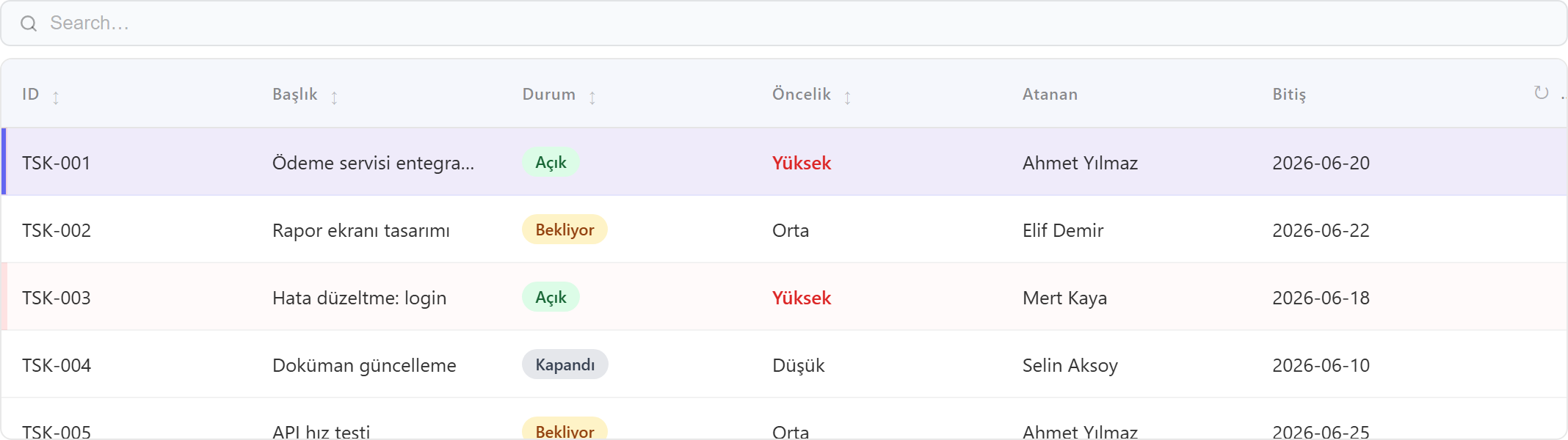
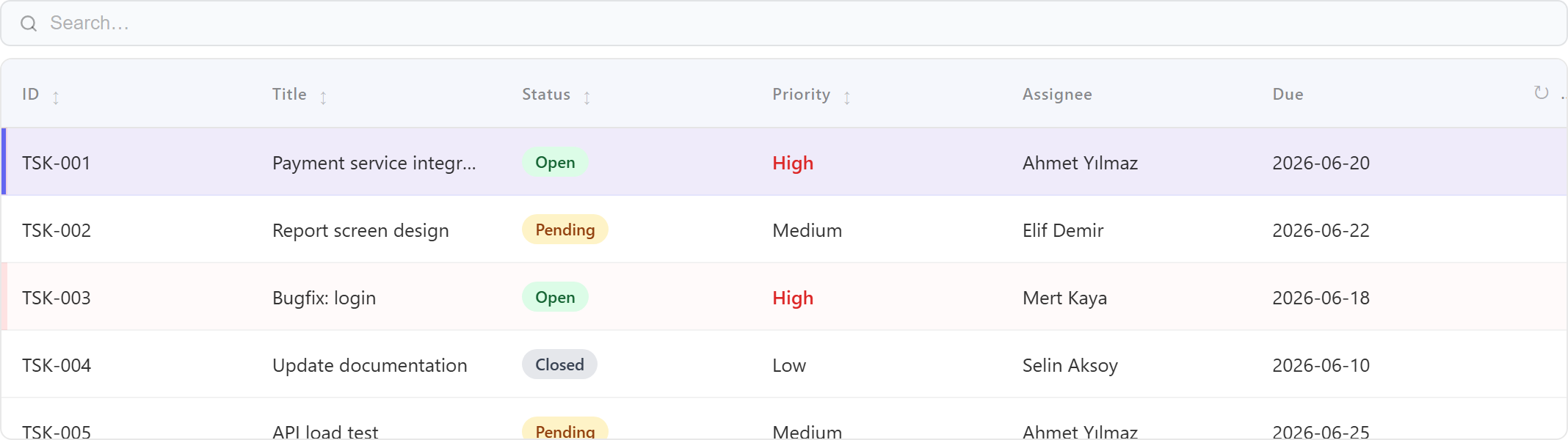
Amaç: Bir tablonun satırlarını liste olarak göstermek; arama, sıralama, sayfalama, satır seçimi, hücre linkleri ve değere göre renklendirme. Dört sekmesi vardır: Data · Columns · Appearance · Behavior.Purpose: Show a table's rows as a list; search, sort, paging, row selection, cell links and value-based coloring. It has four tabs: Data · Columns · Appearance · Behavior.
Data
- Table — bu tablonun kaynağı. Boş bırakılırsa formun tablosu kullanılır; farklı bir tablo seçilirse bağımsız (child) tablo olur.Table — this table's source. If blank, the form's table is used; if a different table is chosen it becomes a standalone (child) table.
- Link Parameters — bağımsız tabloyu ana satıra bağla (Parent→Child); master-detay (Bölüm 6.10).Link Parameters — bind a standalone table to the master row (Parent→Child); master-detail (Section 6.10).
Columns — kolon özellikleriColumns — per-column properties
| ÖzellikProperty | AçıklamaDescription |
|---|---|
| Field | Gösterilecek kaynak kolon.The source column to display. |
| Label | Sütun başlığı.Column header text. |
| Sortable | Başlığa tıklayınca sırala.Click header to sort. |
| Width | Sütun genişliği.Column width. |
| Format | Koşullu biçimlendirme (aşağıda).Conditional formatting (below). |
| Link | Hücreyi tıklanır yap (aşağıda).Make the cell clickable (below). |
Koşullu biçimlendirme (hücre kuralları)Conditional formatting (cell rules)
Bir kolonun hücrelerini değerine göre renklendirir. Önce bir Stil seçilir, sonra kural listesi tanımlanır. İlk eşleşen kural kazanır.Colors a column's cells by value. First pick a Style, then define a list of rules. The first matching rule wins.
| Stil (mode)Style (mode) | SonuçResult |
|---|---|
| Pill | Değer renkli bir etiket/rozet olarak gösterilir.The value shows as a colored label/badge. |
| Cell background | Hücrenin arka planı renklenir.The cell background is colored. |
| Text color | Yalnız yazı rengi değişir.Only the text color changes. |
Her kural = Operatör + Değer + Arka plan rengi + Yazı rengi. Operatörler: = · ≠ · > · < · ≥ · ≤ · contains · empty · not empty. (empty/not empty değer almaz.)Each rule = Operator + Value + Background + Text color. Operators: = · ≠ · > · < · ≥ · ≤ · contains · empty · not empty. (empty/not empty take no value.)
Status kolonu · Stil = Pill · kurallar: = "Open" → yeşil · = "Pending" → turuncu · = "Closed" → gri.Status column · Style = Pill · rules: = "Open" → green · = "Pending" → amber · = "Closed" → gray.Satır renklendirme (Row Coloring)Row coloring (Row rules)
Appearance sekmesinde: tüm satırı bir değere göre renklendirir. Her kural Alan + Operatör + Değer → Satır rengi. Yine ilk eşleşen kazanır.On the Appearance tab: colors the whole row by a value. Each rule is Field + Operator + Value → Row color. Again, first match wins.
Priority = "High" → kırmızı tonu · Status = "Closed" → soluk gri.Priority = "High" → red tint · Status = "Closed" → muted gray.Hücre linki (Cell link)Cell link
Bir kolonu tıklanır yapar. Type: Navigate / Open Window · Form (açılacak) · pencere için başlık, konum (Center/Left/Right/Absolute), genişlik/yükseklik · Parameters: kaynak kolon → p_paramName (değer hedef forma aktarılır).Makes a column clickable. Type: Navigate / Open Window · Form to open · for windows: title, position (Center/Left/Right/Absolute), width/height · Parameters: source column → p_paramName (value passed to the target form).
Behavior
| AyarSetting | AçıklamaDescription |
|---|---|
| Display-only | Açıksa satır tıklaması form-geneli seçimi sürüklemez (bağlı grafik/tablo süzülmez); yalnız hücre linkleri çalışır.When on, a row click does not drive the form-wide selection (linked chart/table won't filter); only cell links work. |
| Allow search | Tablonun üstünde arama kutusu.A search box above the table. |
| Max Record Count | Çekilecek azami satır.Max rows fetched. |
| Order By / Group By | Varsayılan sıralama / gruplama.Default sort / grouping. |
| Density · Zebra · Compact header | Satır sıklığı, zebra şerit, sıkışık başlık.Row density, zebra stripes, compact header. |
| Truncate cells (+ max chars) | Uzun hücreleri kısalt.Truncate long cells. |
| Mobile view | Dar ekranda görünüm modu (kart/tablo).Layout mode on narrow screens (card/table). |
Mobil görünüm (Appearance). Tablolar için bir mobil mod ayarı vardır. Cards seçildiğinde dar ekranlarda her satır "Etiket : değer" şeklinde kaydırılabilir bir karta dönüşür; boş hücreler hizalı bir "—" ile gösterilir. Scroll (varsayılan) ise kolonları okunaklı genişlikte tutup tabloyu yana kaydırır.Mobile layout (Appearance). Tables have a mobile mode. With Cards, on narrow screens each row becomes a swipeable "Label : value" card; empty cells show an aligned "—". Scroll (default) keeps columns readable and scrolls the table sideways.
6.4 · Grafikler (Charts)Charts
Tipler: Bar · Line · Area · Pie · Donut · Number (tek KPI değeri) · Gantt. Her grafik bir tabloyu toplulaştırarak (group-by + aggregate) çizer.Types: Bar · Line · Area · Pie · Donut · Number (single KPI value) · Gantt. Each chart aggregates a table (group-by + aggregate).
İki kurgu yöntemiTwo ways to define data
| YöntemMethod | AçıklamaDescription |
|---|---|
| TekilSingle Label / Value | Basit grafik: bir Label alanı (X ekseni / dilim) + bir Value (ölçü).Simple chart: one Label field (X axis / slice) + one Value (measure). |
| ÇokluMulti Dimensions & Measures | Gelişmiş: birden çok boyut ve ölçü. Açıkken tekil Label/Value'yu geçersiz kılar.Advanced: multiple dimensions and measures. When on, it overrides single Label/Value. |
Boyutlar (Dimensions) ve Ölçüler (Measures)Dimensions & Measures
- Boyut · rol = Axis → X ekseni (gruplama). rol = Series → renkli kırılım.Dimension · role = Axis → X axis (grouping). role = Series → colored breakdown.
- Ölçü = Aggregation (
COUNT,SUM,AVG,MIN,MAX) + alan + etiket + eksen (sol/sağ).Measure = Aggregation (COUNT,SUM,AVG,MIN,MAX) + field + label + axis (left/right). - Seri sayısı = (Series-boyutları) × (Ölçüler); her ölçü ayrı bir stack'tir.Series = (Series dimensions) × (Measures); each measure is a separate stack.
Month · Series = Status · Measure = COUNT → her ay, durumlara göre kırılmış yığın bar grafiği.Axis = Month · Series = Status · Measure = COUNT → a stacked bar per month, broken down by status.Diğer ayarlarOther settings
| AyarSetting | AçıklamaDescription |
|---|---|
| Tarih gruplamaDate grouping | Tarih alanını gün/ay/yıl olarak grupla (date-trunc); etiketler lokalize; drill için sayısal anahtar saklanır.Group a date field by day/month/year (date-trunc); labels localized; a numeric key is kept for drill-through. |
| Kategori renkleriCategory colors | Seri/dilim değerlerini sabit renge eşle; listeden distinct değer çek.Map series/slice values to fixed colors; pull distinct values from the list. |
| Eksen / görünümAxis / appearance | Eksen adları, yatay/dikey bar, stack/grup, etiketler.Axis names, horizontal/vertical bars, stacked/grouped, labels. |
Drill-through
Bir çubuğa/dilime tıklayınca, o değere filtreli bir form açar (pencere veya yönlendirme). Tıklanan grup değeri (ve tarih gruplamada sayısal anahtar) hedef forma parametre olarak geçer — böylece "Haziran" çubuğuna tıklayan kullanıcı yalnız Haziran kayıtlarını görür.Clicking a bar/slice opens a form filtered to that value (window or navigate). The clicked group value (and the numeric key for date grouping) is passed as a parameter to the target form — so a user clicking the "June" bar sees only June records.
Link Parameters & Custom SQL
- Link Parameters — ana satır seçilince grafiği o satıra göre süz (Parent→Child; Bölüm 6.10).filter the chart by the selected master row (Parent→Child; Section 6.10).
- Custom SQL — ileri seviye: doğrudan SQL yazın; sonuç kolonlarını
AS label,AS valueolarak verin; drill içinAS grpkeyekleyin. Link/filtre WHERE'leri otomatik enjekte edilir.advanced: write raw SQL; expose result columns asAS label,AS value; addAS grpkeyfor drill-through. Link/filter WHEREs are injected automatically.
6.5 · Board (Kanban)Board (Kanban)
Amaç: Kayıtları durum kolonlarında kart olarak göstermek; bir kartı başka kolona sürükleyip bırakınca durum alanı DB'de güncellenir. Dört sekme: Data · Cards · Appearance · Behavior.Purpose: Show records as cards in status columns; dragging a card to another column updates the status field in the DB. Four tabs: Data · Cards · Appearance · Behavior.
| Sekme / AyarTab / Setting | AçıklamaDescription |
|---|---|
| Data · Connection/Schema/Table | Kartların kaynağı (boşsa formun bağlantısı).The source of the cards (form connection if blank). |
| Data · Group / Status alanıGroup / Status field | Kolonları (durumları) belirleyen kolon. Kart sürüklenip bırakılınca bu alan hedef kolonun değerine güncellenir.The column that defines the columns (statuses). Dropping a card updates this field to the target column's value. |
| Cards · ID field | Kartta gösterilen, tıklanır kimlik (link açar).The clickable id shown on the card (opens the link). |
| Cards · Title field | Kartın başlığı.The card title. |
| Cards · Badge fields | Kartta rozet olarak gösterilen ek kolonlar.Extra columns shown as badges on the card. |
| Appearance · Renk / düzenColor / layout | Kolon/kart kategori renkleri; yatay/dikey düzen; yükseklik.Column/card category colors; horizontal/vertical layout; height. |
| Behavior · Link | Kimliğe tıklayınca form aç (window/navigate + konum/boyut + parametreler).Open a form on id click (window/navigate + position/size + parameters). |
| Behavior · Link Parameters | Ana satır seçilince board'u o satıra göre süz (Parent→Child).Filter the board by the selected master row (Parent→Child). |
6.6 · Calendar
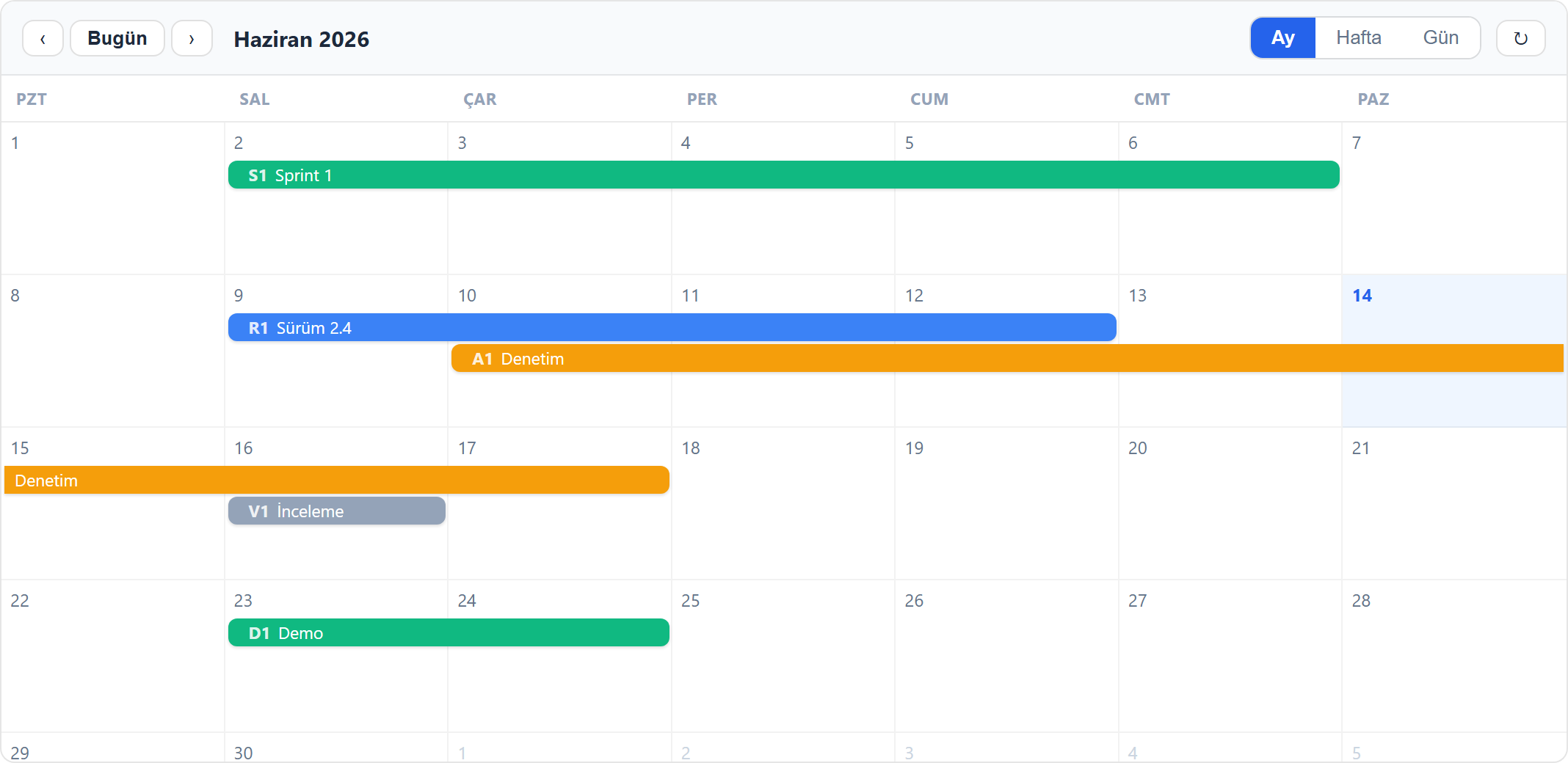
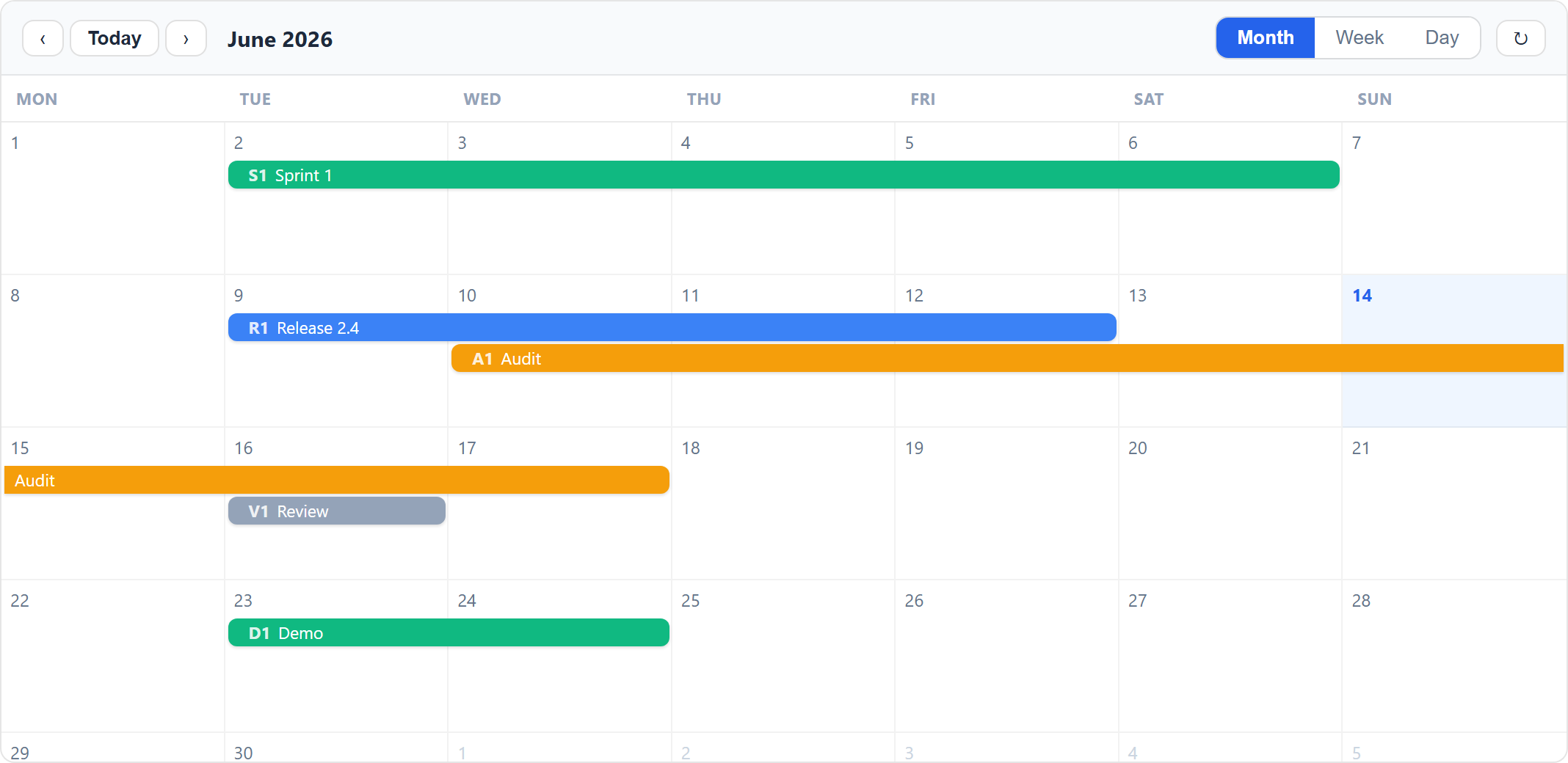
Amaç: Bir tablonun tarih alanlarına göre kayıtları takvimde göstermek. Çok günlük kayıtlar tek bir spanning bar olarak çizilir; uçlarından sürükleyerek tarih değiştirilebilir.Purpose: Show table rows on a calendar by their date fields. Multi-day records render as one spanning bar; drag the edges to change dates.
Data
| Alan / Field | Açıklama / Description |
|---|---|
| Connection / Schema / Table | Olayların kaynağı.Source of the events. |
| Start field * | Başlangıç tarihi/saati. Yalnızca tarih ise tüm gün.Start date/time. Date-only = all-day. |
| End field | Opsiyonel bitiş. Varsa çok günlük tek çubuk.Optional end. If set, multi-day spanning bar. |
| Title / ID / Color by / Badge fields | Etiket, tıklanır kimlik, kategori rengi, ek rozetler.Label, clickable id, category color, extra badges. |
Appearance
Language (ay/gün adları, Today/Month/Week/Day — 7 dil + Auto), varsayılan görünüm, hafta başlangıcı, saat aralığı, yükseklik, kategori renkleri.Language (month/day names and Today/Month/Week/Day — 7 languages + Auto), default view, week start, hour range, height, category colors.
Link
Kimliğe tıklayınca form açma (pencere/yönlendirme), pencere konumu ve tıklanan satırdan ek parametreler geçme.Open a form on id click (window/navigate), window position, and pass extra parameters from the clicked row.
6.7 · Tree
Amaç: Kendine-referanslı bir tablodaki (satırda id ve parentId) hiyerarşiyi ağaç olarak göstermek — kategori, bölge, organizasyon şeması, BOM.Purpose: Render the hierarchy of a self-referencing table (each row has id and parentId) as a tree — categories, regions, org charts, BOM.
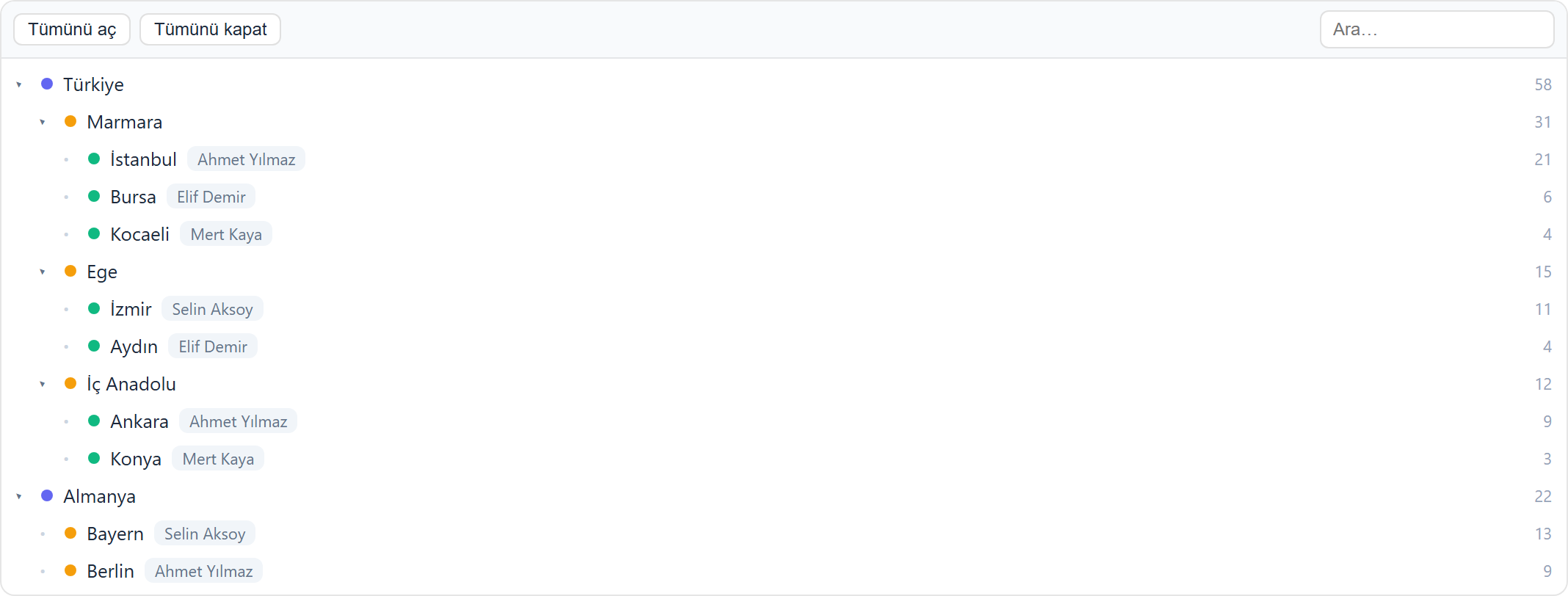
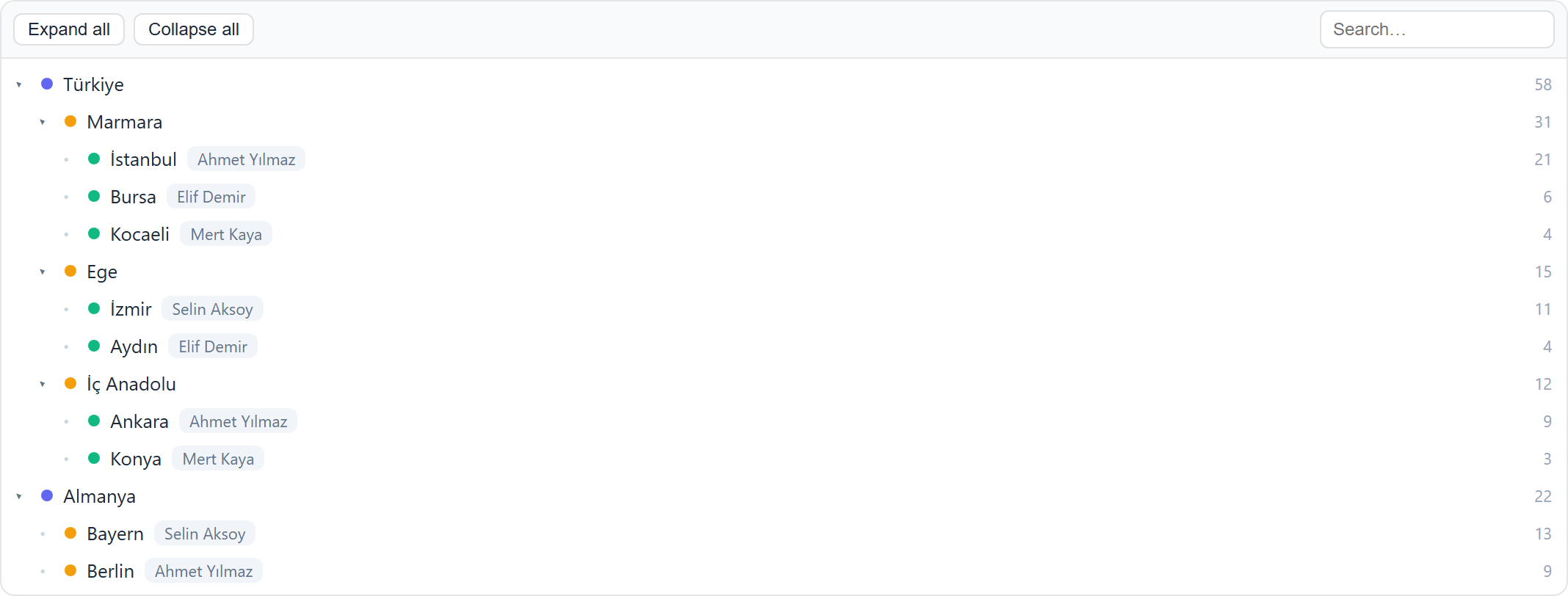
Data
| Alan / Field | Açıklama / Description |
|---|---|
| ID field * | Düğümün kimliği.Node id. |
| Parent field * | Üst düğüm kimliği. Boş/NULL (veya Root value) olanlar kök.Parent id. Empty/NULL (or Root value) rows are roots. |
| Label / Root value / Sort / Color by / Count / Badges | Metin, kök işareti, sıralama, kategori rengi, sayaç, rozetler.Text, root marker, ordering, category color, count, badges. |
Appearance
Load mode: Full (tüm satırlar — anında aç/kapa) veya Lazy (çocuklar açılınca yüklenir — devasa ağaçlar). Default expand, Allow drag re-parent (sürükle-bırakla parentId güncelle), dil, yükseklik, kategori renkleri.Load mode: Full (all rows — instant expand) or Lazy (children loaded on expand — huge trees). Default expand, Allow drag re-parent (drag-drop to update parentId), language, height, category colors.
Link & SüzmeFiltering
Calendar ile aynı: node tıklayınca form aç + parametreler; Link Parameters (filter) ile ağacı süz.Same as Calendar: open a form on node click + parameters; filter the tree via Link Parameters (filter).
6.8 · Viewer
Amaç: Dosya/içerik gösterimi: PDF · Word · Excel · CSV · Görsel · Video · Audio · Markdown · HTML · Code.Purpose: Display file/content: PDF · Word · Excel · CSV · Image · Video · Audio · Markdown · HTML · Code.
- Kaynak: yüklenen dosya veya bir dış URL (URL önceliklidir; izole iframe'de açılır).Source: an uploaded file or an external URL (URL takes priority; shown in an isolated iframe).
- Not: Hedef site
X-Frame-Options/CSP ile çerçevelemeyi engelliyorsa tarayıcı bloklar (bu uzak sitenin ayarıdır).Note: If the target site forbids framing viaX-Frame-Options/CSP, the browser blocks it (that is the remote site's setting).
6.9 · Panel ve TabPanel & Tab
Amaç: Diğer komponentleri gruplayan kapsayıcılar. İçlerine alan, tablo, grafik, board, calendar ve tree koyulabilir.Purpose: Containers that group other components. They can hold fields, tables, charts, boards, calendars and trees.
| AyarSetting | AçıklamaDescription |
|---|---|
| Panel · Hide title | Başlık çubuğu gizlenir; panel düz bir kapsayıcı olur.Hides the title bar; the panel becomes a plain container. |
| Panel · Collapsible / Start collapsed | İçerik katlanabilir; formda kapalı başlayabilir.Content can collapse; can start collapsed on load. |
| Panel · Allow maximize | Paneli çalışma alanını dolduracak şekilde büyütme.Maximize the panel to fill the working area. |
| Tab · SekmelerTabs | Birden çok sekme; her çocuk bir tabId ile bir sekmeye bağlanır.Multiple tabs; each child binds to a tab via a tabId. |
6.10 · Filtre, Link ve ReloadFilters, Links & Reload
Filter paneliFilter panel
Form üzerindeki Filter paneli; tablo, grafik, board, calendar ve tree komponentlerini birlikte süzer. Komponent farklı bir datasource kullanıyorsa filtre alanı Link Parameters (Parent → Child) ile doğru kolona çevrilir.The form's Filter panel filters table, chart, board, calendar and tree together. If a component uses a different datasource, the filter field is mapped to the right column via Link Parameters (Parent → Child).
Master-detayMaster-detail
Ana tabloda bir satır seçilince, ona Link Parameters ile bağlı komponentler o satıra göre yeniden sorgulanır.When a row is selected in the master table, components linked via Link Parameters re-query for that row.
Tıklayınca form açmaOpen-on-click
Link sekmesi: pencere (konumlandırılabilir, küçültülebilir) veya yönlendirme. Tıklanan satırdan ek parametreler hedef forma aktarılır.Link tab: window (positionable, minimizable) or navigate. Extra parameters from the clicked row are passed to the target form.
Arama alanları (Search Fields). Bir alan isSearchField olarak işaretlenebilir; kullanıcı bu alanlara değer girip Search ile tabloyu filtreler, Clear Search ile sıfırlar. Değerler WHERE kurallarına çevrilir. Tablolar iki yoldan yüklenebildiği için (ana tablo ve alt/ilişkili tablo) filtre her ikisini de kapsar.Search fields. A field can be marked isSearchField; the user fills these, then filters the table with Search and resets with Clear Search. Values become WHERE rules. Since tables can load via two paths (main and child/related), the filter covers both.
6.11 · Rules (Kurallar)(Rules)
Amaç: Form üzerinde koşullu otomasyon. Bir kural üç parçadan oluşur: Tetikleyici → Koşullar → Aksiyonlar. Form sekmelerinden Rules ile yönetilir.Purpose: Conditional automation on a form. A rule has three parts: Trigger → Conditions → Actions. Managed from the Rules form tab.
1 · Tetikleyici (When)Trigger (When)
Kuralı neyin çalıştıracağını seçer:Selects what runs the rule:
| Trigger | Ne zamanFires when |
|---|---|
| Form opens | Form açıldığında. Scope ile sınırlanır: Tüm / yalnız yeni / yalnız mevcut kayıtlar.The form opens. Limited by Scope: All / only new / only existing records. |
| Field changes | Seçilen bir alan (watch field) değiştiğinde.A chosen field (watch field) changes. |
| Before save | Kaydetmeden hemen önce (değer atama / doğrulama için).Just before save (to set values / validate). |
| Save succeeds / fails | Kayıt başarılı / başarısız olduğunda.After a successful / failed save. |
| Row selected / deselected | Tabloda satır seçilince / seçim kalkınca.A table row is selected / deselected. |
| Validation fails | Doğrulama hatasında.On a validation error. |
| Form cancelled / closes | Form iptal edilince / kapanınca.The form is cancelled / closed. |
2 · Koşullar — iki blokConditions — two blocks
Aksiyonlar yalnız koşullar sağlanınca çalışır. İki bağımsız blok birlikte değerlendirilir:Actions run only when conditions hold. Two independent blocks are evaluated together:
a) User koşullarıa) User conditions — kuralı kime uygulayacağınızı belirler (yetki/rol kapısı). AND/OR ile çoklu.gate the rule by who the user is (a permission/role gate). Multiple, AND/OR.
| TipType | AnlamMeaning |
|---|---|
| Has Capability | Kullanıcının belirli bir yetkisi varsa. Yetkiler kullanıcının kendi tanımı + üye olduğu gruplardan miras alınanların birleşimidir (Bölüm 3).The user has a given capability. Capabilities are the union of the user's own + those inherited from their groups (Section 3). |
| Is in Group | Belirli bir gruptaysa.Is in a specific group. |
| Is in / Not in Any Group | Herhangi bir gruba üyeyse / değilse.Is / is not a member of any group. |
| Groups in Field · User in Field | Kullanıcının grubu bir alandaki değerle eşleşirse · kullanıcı bir alandaki kişiyse.The user's group matches a field's value · the user is the person referenced in a field. |
| Is Admin / Is Not Admin | Yönetici ise / değilse.Is / is not an admin. |
b) Field koşullarıb) Field conditions — Alan + Operatör + Değer. Operatörler: = ≠ > < ≥ ≤ contains between in empty/notEmpty. AND/OR. Hiç koşul yoksa kural her zaman çalışır.Field + Operator + Value. Operators: = ≠ > < ≥ ≤ contains between in empty/notEmpty. AND/OR. With no conditions the rule always runs.
3 · Aksiyonlar (Then)Actions (Then)
Koşullar sağlanınca çalışacak bir veya daha fazla aksiyon. Her aksiyonun bir hedefi (alan/komponent) vardır:One or more actions that run when conditions are met. Each action has a target (field/component):
| GrupGroup | AksiyonAction | Ne yaparWhat it does |
|---|---|---|
| Set Value (değer ata)(set a value) | Fixed · Now · Sequence ID | Sabit değer · şu anki tarih/saat · otomatik kimlik.A fixed value · the current date/time · an auto id. |
| Current User · … | Oturumdaki kullanıcının ID / Ad / Soyad / Kullanıcı adı / E-posta / Telefon / Dil / Organizasyon / Departman / Yönetici bilgisi.The logged-in user's ID / First / Last / User name / Email / Phone / Language / Organization / Department / Manager. | |
| Set to User / Group / Org | Belirli bir kullanıcı, grup veya organizasyon değeri.A specific user, group or organization value. | |
| User / Group / Org Field Property | Bir alandaki kişinin/grubun/org'un bir özelliğini (e-posta, yönetici, departman…) yaz.Write a property (email, manager, department…) of the user/group/org in a field. | |
| Expression | Diğer alanlardan hesaplanan ifade.An expression computed from other fields. | |
| Null | Alanı temizle.Clear the field. | |
| Visibility | Show | Hedef alanı/komponenti göster.Show the target field/component. |
| Hide | Gizle.Hide it. | |
| State | Enable / Disable | Düzenlenebilir / salt-okunur yap.Make editable / read-only. |
| Mandatory / Optional | Zorunlu / isteğe bağlı yap.Make required / optional. | |
| Set Style | Bir Badge alanının rengini değere göre dinamik değiştir.Dynamically set a Badge field's color by value. | |
| Mesaj & AkışMessaging & flow | Show message | Başlık + zengin gövde + tip (bilgi/uyarı). {{ }} değişkenli.Title + rich body + type (info/warning). Supports {{ }}. |
| Navigate to | Hedef form + parametreler (alan→değer) + pencere (başlık, genişlik/yükseklik).Target form + parameters (field→value) + open in a window (title, width/height). | |
| Send email | Alıcılar (To/CC/BCC), Konu, gövde — {{ }} değişkenli.Recipients (To/CC/BCC), Subject, body — supports {{ }}. | |
| Trigger workflow | Bir workflow seç; kayıt bağlamı akışa geçer.Pick a workflow; the record context is passed to it. | |
| Write to table | Bir tabloya satır yaz (kolon→değer eşlemeleri).Write a row to a table (column→value mappings). | |
| Agentic task | Canlı veri üzerinde AI görevi (sorgula/yaz/mail); {{Alan}} ile alan referansı. Arka planda veya canlı AI penceresinde çalışır — bkz. §11.2.An AI task on live data (query/write/email); reference fields with {{Field}}. Runs in the background or in a live AI window — see §11.2. | |
| Kısıtla & KontrolRestrict & control | Limit values | Alanın kabul ettiği değerleri sınırla (tarihte now+5d gibi).Restrict accepted values (e.g. now+5d for dates). |
| Limit field options | Bir açılır listenin seçeneklerini daralt.Narrow a dropdown's options. | |
| Form control · Panel button | Panel aksiyonlarını kapat · bir panel butonunun durumunu/modunu değiştir.Disable panel actions · change a panel button's state/mode. |
Aksiyon ayrıntıları (her aksiyonun ayarları)Action details (settings of each action)
- Show message — Tip (Normal · Info · Success · Warning · Error) + Başlık + zengin Gövde. İkisinde de
{{Alan}}değişkeni.Type (Normal · Info · Success · Warning · Error) + Title + rich Body. Both accept{{Field}}. - Navigate to — Hedef: Form veya Menu Item. Open in Window (başlık · konum Center/Left/Right/Absolute · genişlik/yükseklik). Parametreler: hedef alan ← Fixed (sabit) veya Field (kaynak alan).Target: Form or Menu Item. Open in Window (title · position Center/Left/Right/Absolute · width/height). Parameters: target field ← Fixed or Field (source).
- Send email — To / CC / BCC (Enter ile çoklu adres) + Subject + zengin Body;
{{Alan}}destekli.To / CC / BCC (multiple, Enter to add) + Subject + rich Body; supports{{Field}}. - Write to table — Connection → Schema → Table + Field Mappings: hedef kolon ← Field / Static / Built-in (Now, Current User…).Connection → Schema → Table + Field Mappings: target column ← Field / Static / Built-in (Now, Current User…).
- Trigger workflow — Listeden bir workflow seç; mevcut kayıt bağlamı akışa geçer.Pick a workflow from the list; the current record context is passed.
- Limit field options / Limit values — Bir alanın kabul ettiği değerleri sınırla: Fixed / Now / Current User·… veya tarih ifadeleri (
now+5d).Restrict the values a field accepts: Fixed / Now / Current User·… or date expressions (now+5d).
{{ }} değişkenli) · Navigate To (form + pencere + parametre).Three action editors (illustrative): Show Message (type + title + body) · Send Email (To/CC/BCC + subject + body, with {{ }}) · Navigate To (form + window + parameter).{{AlanAdı}}— alanın güncel değeri.the field's current value.{{old.AlanAdı}}— önceki değer (kayıt açıldığındaki). Değişiklik takibi / önce-sonra için: "Status{{old.Status}}→{{Status}}".the previous value (at record load). For change tracking / before-after: "Status{{old.Status}}→{{Status}}".- Oturumdaki kullanıcı özellikleri (ad, e-posta vb.).Logged-in user properties (name, email, etc.).
CreatedBy = Current User · CreatedAt = Now.2. When Status değişti · Field: Status = "Approved" · User: "Manager" grubunda →
ApprovedBy = Current User · Hide "Reject" · Disable tüm alanlar · Send email (talep sahibine).3. When Before save · Field: Amount > 10000 → Trigger workflow (onay akışı). 1. When Form opens (new records only) →
CreatedBy = Current User · CreatedAt = Now.2. When Status changes · Field: Status = "Approved" · User: in the "Manager" group →
ApprovedBy = Current User · Hide "Reject" · Disable all fields · Send email (to the requester).3. When Before save · Field: Amount > 10000 → Trigger workflow (approval flow).
AdımlarSteps
- Form → Rules sekmesi → kural ekle.Form → Rules tab → add a rule.
- Tetikleyiciyi seçin, koşulları (When) girin, AND/OR belirleyin.Pick the trigger, add conditions (When), set AND/OR.
- Bir veya daha fazla aksiyon (Then) ekleyin; her birine hedef ve değer verin.Add one or more actions (Then); give each a target and value.
- Kaydedin; kurallar yukarıdan aşağıya değerlendirilir (sürükleyerek sıralayın).Save; rules evaluate top to bottom (drag to reorder).
Koşul — "Record Exists". Bir kural koşulu olarak veritabanında kayıt sayısı (count) sorgulanabilir. Tipik kullanım: kaydetmeden önce (Before-Save) mükerrer kontrolü — aynı değere sahip kayıt varsa kaydı engelle. Koşul bir sorgu tipindedir ve prefetch-cache ile asenkron değerlendirilir.Condition — "Record Exists". A rule condition can query a record count in the database. Typical use: a before-save duplicate guard — block the save if a record with the same value exists. The condition is a query type, evaluated asynchronously via a prefetch cache.
Aksiyon — Uygulama-içi mesaj. Bir kural aksiyonu olarak kullanıcıya veya gruba uygulama-içi mesaj (bildirim) gönderilebilir; e-posta gönderme editörünün bir benzeri kullanılır. Alıcı bir grupsa mesaj üyelerine açılır.Action — In-app message. As a rule action, an in-app message (notification) can be sent to a user or group, using an editor similar to send-email. If the recipient is a group, the message expands to its members.
Çok dallı kurallar (if / else-if / else). Bir kural artık tek bir if/else yerine birden çok dal içerebilir: WHEN (tetikleyici) bir kez tanımlanır; ardından IF, istenildiği kadar "Else If" ve bir Else dalı gelir. Her dalın kendi koşulları ve aksiyonları vardır; sıradaki ilk eşleşen dal çalışır. Bu, çok sayıda ayrı kuralı tek ve okunaklı bir kurala indirir.Multi-branch rules (if / else-if / else). A rule can now hold multiple branches instead of a single if/else: the WHEN (trigger) is defined once; then come IF, as many "Else If" branches as needed, and an Else branch. Each branch has its own conditions and actions; the first matching branch in order runs. This collapses many separate rules into one readable rule.
Kuralları hata ayıklama (Rule Debug)Debugging rules (Rule Debug)
Amaç: Bir kuralı tasarladıktan sonra, çalışma zamanında (portal) bir formda hangi kuralların tetiklendiğini ve etkilerini canlı izlemek. Yalnız admin görür; her oturuma özeldir (global bayrak yok).Purpose: After designing a rule, watch live at runtime (portal) which rules fire on a form and their effects. Visible to admins only; per-session (no global flag).
- Açma: köşedeki yüzen 🐞 butonu (admin) veya URL'ye
?debug=1ekleyerek. Çekmecede On/Off anahtarı.Open: the floating 🐞 button (admin) or add?debug=1to the URL. An On/Off toggle is in the drawer. - İki sekme: Flow (tetiklenen kurallar + alan değişimleri; atlananlar ve nedeni) ve Server SQL (gönderilen açık SQL + süre/satır/hata). Copy ile trace+SQL panoya alınır.Two tabs: Flow (fired rules + field changes; skipped ones and why) and Server SQL (the plain SQL sent + time/rows/error). Copy exports trace+SQL.
6.12 · Queries (Sorgular)(Queries)
Amaç: Bir formun verisinin önceden filtrelenmiş görünümleri (Query Presets). Adlandırılmış bir sorgu, bir menü öğesine Query Preset olarak bağlanır (Bölüm 5); o menüden açılınca form yalnız filtreye uyan kayıtları gösterir. Aynı form farklı menülerde farklı sorgularla görünebilir: "Açık Çağrılar", "Benim Kayıtlarım", "Bekleyen Onaylar"…Purpose: Pre-filtered views of a form's data (Query Presets). A named query is attached to a menu item as a Query Preset (Section 5); opening the form from that menu shows only the matching rows. The same form can appear under different menus with different queries: "Open Issues", "My Records", "Pending Approvals"…
Koşul anatomisiCondition anatomy
Her koşul = Alan + Operatör + Değer kaynağı + Değer, AND/OR ile birleşir. Koşul yoksa sorgu tüm satırları gösterir.Each condition = Field + Operator + Value source + Value, combined with AND/OR. With no conditions the query shows all rows.
OperatörlerOperators
| GrupGroup | OperatörlerOperators |
|---|---|
| Standard | = · != · > · < · >= · <= · LIKE / NOT LIKE · IN · IS NULL / IS NOT NULL |
| Date — Relative | Today · Yesterday · This/Last Week · This/Last Month · This/Last Year (değer almaz; bugünün tarihine göre)(no value; relative to today) |
| Date — Rolling | Last N Days · Last N Hours · Next N Days (N sayısını siz verirsiniz)(you supply N) |
Değer kaynağıValue source
| KaynakSource | AnlamMeaning |
|---|---|
| Fixed value | Sabit bir değer (siz yazarsınız).A fixed value you type. |
| Current user | Oturumdaki kullanıcının kimliği — "Benim kayıtlarım" gibi kişiye özel görünümler.The logged-in user's id — for personal views like "My records". |
| My groups / My organizations | Kullanıcının grupları / organizasyonları — ekip/birim bazlı görünümler.The user's groups / organizations — team/unit-scoped views. |
Approval State (onay durumu)Approval State
Onay-etkin formlarda özel bir koşul: kayıtları onay durumuna göre süz — Waiting Approvals (bekleyen) · Approved Records · Rejected Records · All Approvals.On approval-enabled forms, a special condition that filters by approval state — Waiting Approvals · Approved Records · Rejected Records · All Approvals.
Bir preset'i kullanmakUsing a preset
?preset=… URL'iyle de açılabilir.)Flow: a query → attached to a menu item as a Query Preset → opening that menu loads the form filtered. (Can also be opened via a ?preset=… URL.)Status ≠ "Closed".2. Benim Kayıtlarım:
AssignedTo = Current user.3. Bu ay açılanlar:
CreatedAt operatör = This Month.4. Bekleyen onaylar: Approval State = Waiting. 1. Open Issues:
Status ≠ "Closed".2. My Records:
AssignedTo = Current user.3. Opened this month:
CreatedAt operator = This Month.4. Pending approvals: Approval State = Waiting.
AdımlarSteps
- Form → Queries sekmesi → + Add Query; bir ad verin.Form → Queries tab → + Add Query; name it.
- Koşulları ekleyin (Alan/Operatör/Değer kaynağı/Değer), AND/OR seçin.Add conditions (Field/Operator/Value source/Value), choose AND/OR.
- Kaydedin; Apps'te bir menü öğesine Query Preset olarak atayın (Bölüm 5).Save; assign it as a Query Preset on a menu item in Apps (Section 5).
Preset'ten kayıt yükleme (tablosuz form). Bir tabloya bağlı olmayan kayıt formu, bir Query preset üzerinden tek kayıt yükleyebilir — örneğin oturum açan kullanıcının kendi profilini CurrentUser.username gibi değer tipleriyle getirme.Preset record load (table-less form). A record form not bound to a table can load a single record via a Query preset — e.g., fetching the signed-in user's own profile using value types like CurrentUser.username.
6.13 · Buttons (Butonlar)(Buttons)
İki tür: Canvas butonu (forma yerleştirilen) ve Panel butonu (formun alt aksiyon çubuğundaki global butonlar — panelButtons; onay formlarında approvalPanelButtons). Her butonun üç sekmesi vardır.Two kinds: a Canvas button (placed on the form) and a Panel button (global buttons in the form's bottom action bar — panelButtons; approvalPanelButtons on approval forms). Each button has three tabs.
| SekmeTab | İçerikContent |
|---|---|
| Appearance | Etiket, variant (primary / secondary / danger…), boyut, hizalama.Label, variant (primary / secondary / danger…), size, alignment. |
| Action | Butonun ne yaptığı (aşağıdaki tablo).What the button does (table below). |
| Visibility | Butonun ne zaman görüneceği/aktif olacağı (koşullar — Rules'taki gibi).When the button is shown/enabled (conditions — like Rules). |
Aksiyon tipleriAction types
| Action | Açıklama + ayarlarıDescription + settings |
|---|---|
| Save | Formu kaydeder. Alan atamaları: kaydederken alanlara değer set edebilir (Fixed, Now, Current User · …, Set to User/Group/Org — Rules'taki Set Value ile aynı set).Saves the form. Field assignments: can set values on save (Fixed, Now, Current User · …, Set to User/Group/Org — same set as Rules → Set Value). |
| Delete | Seçili kaydı siler.Deletes the current record. |
| Navigate | Başka form açar. Target form + parametreler (Parent→hedef alan; kaynak Field veya Static) + pencere aç (konum: center/left/right/absolute, genişlik/yükseklik).Opens another form. Target form + parameters (Parent→target field; source Field or Static) + open in window (position: center/left/right/absolute, width/height). |
| Workflow | Bir iş akışını tetikler (workflowId); kayıt bağlamını akışa geçirir.Triggers a workflow (workflowId); passes the record context to the flow. |
| Approve / Reject / Cancel | Onay akışında karar butonları.Decision buttons in an approval flow. |
Status = "Pending" iken görünür. "Kaydet" butonu: Action = Save, atama: UpdatedAt = Now, UpdatedBy = Current User."Approve" button: Action = Workflow (approval flow) · Appearance = primary · Visibility = only when Status = "Pending". "Save" button: Action = Save, assigns UpdatedAt = Now, UpdatedBy = Current User.7 · İş Akışları ve OnaylarWorkflows & Approvals
AmaçPurpose
Workflow, olaylara (kayıt eklendi/değişti, buton, zamanlanmış tetik) bağlı çok adımlı otomasyonlar kurduğunuz görsel bir tasarımcıdır. Node'ları (kutuları) bir tuvale dizip oklarla bağlarsınız; akış yukarıdan aşağı çalışır: kayıt sorgular, döngü kurar, e-posta/bildirim gönderir, kayıt oluşturur/günceller, dış servis çağırır, onay bekler. Her bir node sağ panelden yapılandırılır; akış kaydedilir, test edilir ve loglardan izlenir.A Workflow is a visual designer where you build multi-step automations bound to events (record created/changed, button, scheduled trigger). You drop nodes (boxes) on a canvas and connect them with arrows; the flow runs top-to-bottom: query records, loop, send email/notification, create/update records, call an external service, wait for approval. Each node is configured from the right panel; the flow is saved, tested, and watched from the logs.
Toolbox — node tipleriToolbox — node types
Soldaki paletten node ekler, tuvalde dizer ve oklarla bağlarsınız. Her node'un kendi ayar paneli vardır.Add nodes from the left palette, arrange them on the canvas and wire them with arrows. Each node has its own settings panel.
| NodeNode | Ne yapar / başlıca ayarlarıWhat it does / key settings |
|---|---|
| ▶ Start | Akışın giriş noktası. Her workflow burada başlar.The flow's entry point. Every workflow starts here. |
| ⊞ Query Records | Bir SELECT çalıştırır; sonucu bir çıktı değişkenine (ör. newOrders) yazar. Bağlantı + sorgu metni. ForEach ve şablonlar bu değişkeni kullanır.Runs a SELECT and writes the result to an output variable (e.g. newOrders). Connection + query text. ForEach and templates consume this variable. |
| ⟳ For Each | Bir sorgu sonucundaki her satır için içindeki node'ları çalıştırır; alanlara {{prefix.Column}} ile erişilir.Runs its inner nodes for each row of a query result; access fields via {{prefix.Column}}. |
| + Create Record | Linked app'in tablosuna yeni kayıt ekler (alan = değer atamaları).Inserts a new record into the linked app's table (field = value assignments). |
| ✎ Update Record | Tetikleyen kaydı (linked app tablosu) günceller.Updates the trigger record (linked app's table). |
| ⊟ Update Table | Herhangi bir tablodaki satır(lar)ın alanlarını günceller (bağlantı/şema/tablo + koşul + atamalar).Updates fields in any table's row(s) (connection/schema/table + condition + assignments). |
| ◎ Notification | E-posta veya uygulama-içi bildirim gönderir. Alıcı, konu, gövde — {{...}} şablonlu.Sends an email or in-app notification. Recipient, subject, body — with {{...}} templating. |
| ◈ Approval | İnsan onayı bekler: bir kullanıcı/gruba iş düşer, akış duraklar; onaylanınca devam, reddedilince dallanır.Waits for human approval: assigns a task to a user/group and pauses; resumes on approve, branches on reject. |
| ⇄ HTTP Request | Dış servise çağrı (method, URL, header, body). Yanıt sonraki adımlarda kullanılabilir.Calls an external service (method, URL, headers, body). The response is usable downstream. |
| ◷ Delay | Belirli bir süre bekler (akış duraklar, sonra resume ile devam eder).Waits for a duration (the flow pauses, then continues via resume). |
| ⑂ Condition | Koşullu dallanma — koşul doğruysa bir yol, değilse diğer yol.Conditional branching — one path if true, another if false. |
| ≡ Log | Log dosyasına satır yazar (tanılama/izleme).Writes a line to the log (diagnostics/tracing). |
| ■ End | Akışı sonlandırır.Ends the flow. |
Karmaşık node'lar (dallanan / bileşik)Compound & branching nodes
Çoğu node tek bir ▶ çıkışına sahiptir (sıradaki node'a bağlanır). Üç node ise birden çok çıkış portu taşır ve akışı dallandırır — bunlar workflow'un en güçlü ama en çok dikkat isteyen parçalarıdır.Most nodes have a single ▶ output (wired to the next node). Three nodes carry multiple output ports and branch the flow — these are the most powerful, and trickiest, parts of a workflow.
⟳ For Each — satır döngüsü⟳ For Each — row loop
Bir Query Records sonucundaki her satır için döngü gövdesindeki node'ları tekrar çalıştırır. En sık kafa karıştıran node budur; iki ayrı portu vardır.Re-runs the nodes in its loop body for each row of a Query Records result. This is the most commonly misunderstood node; it has two distinct ports.
| Ayar / PortSetting / Port | AnlamMeaning |
|---|---|
| Source variable | Üzerinde dönülecek sorgu sonucu — bir Query Records node'unun Output Variable adı (ör. newOrders).The query result to iterate — the Output Variable name of a Query Records node (e.g. newOrders). |
| Row variable prefix | Satır değerlerine erişim öneki (varsayılan row). Gövdede {{row.Sütun}} ile o anki satırın alanlarına ulaşırsınız.Prefix for the current row (default row). In the body, access fields via {{row.Column}}. |
| ⟳ Loop port | Döngü gövdesinin ilk node'una bağlanır. Buraya bağlı tüm node'lar her satırda bir kez çalışır.Wire to the first node of the loop body. Everything chained here runs once per row. |
| ▶ Continue port | Döngü bittikten sonra çalışacak node'a bağlanır.Wire to the node that runs after the loop completes. |
newOrders) → For Each (source = newOrders) → ⟳ Notification (To: {{row.Email}}) → ▶ End. Yeni siparişlerin her birine ayrı e-posta gider.Query Records (newOrders) → For Each (source = newOrders) → ⟳ Notification (To: {{row.Email}}) → ▶ End. Each new order gets its own email.⑂ Condition — koşullu dallanma⑂ Condition — conditional branch
Variable + Operator + Value değerlendirir; doğruysa ✓ Evet, değilse ✗ Hayır portundan devam eder. Operatörler: eq · neq · contains · > · < · >= · <=. Variable alanında {{...}} kullanılabilir (ör. {{row.Status}}).Evaluates Variable + Operator + Value; on true it continues from the ✓ Yes port, otherwise the ✗ No port. Operators: eq · neq · contains · > · < · >= · <=. The Variable can use {{...}} (e.g. {{row.Status}}).
◈ Approval — insan onayı◈ Approval — human approval
Akışı duraklatır, onaylayıcılara e-posta gönderir ve karar gelene kadar bekler; sonra ✓ Approved veya ✗ Rejected portundan dallanır.Pauses the flow, emails the approvers and waits for a decision; then branches from the ✓ Approved or ✗ Rejected port.
| AyarSetting | AnlamMeaning |
|---|---|
| Approval Mode | Sequential (sırayla) · All must approve (hepsi) · Majority (çoğunluk) · Any one (herhangi biri).Sequential · All must approve · Majority · Any one. |
| Approvers (CSV) | Onaylayıcılar — virgülle ayrık; {{user.manager}} gibi şablon veya e-posta.Approvers — comma-separated; templates like {{user.manager}} or emails. |
| Email Subject / Message | Onay e-postasının konu ve gövdesi ({{...}} destekli).Subject and body of the approval email ({{...}} supported). |
| Expiry (hours) | Karar gelmezse onayın geçerlilik süresi (ör. 72 saat).How long the approval stays valid if no decision (e.g. 72 hours). |
| Record Fields | E-postada özet tablo olarak gösterilecek alanlar (Title, Status, Priority). E-posta ayrıca tam kayda View Record bağlantısı içerir.Fields shown as a summary table in the email (Title, Status, Priority). The email also includes a View Record link to the full record. |
Veri & aksiyon node'larının ayarlarıData & action node settings
| Node | Başlıca ayarlarıKey settings |
|---|---|
| ⊞ Query Records | Connection + SQL Query (@param bağlama) + Output Variable. Çıktılar: {{x}} HTML tablo · {{x_count}} satır sayısı · {{x_json}} JSON. Ayrıca tablo stili (default/compact/plain), başlık rengi, Max Rows, boş mesajı.Connection + SQL Query (@param binding) + Output Variable. Outputs: {{x}} HTML table · {{x_count}} row count · {{x_json}} JSON. Plus table style (default/compact/plain), header color, Max Rows, empty message. |
| + Create Record ✎ Update Record | Linked app'in tablosuna otomatik yazar. Alan atamaları: her satır = sütun + değer tipi + değer. Değer tipleri: Fixed · Variable ({{...}}) · Now (UTC zaman) · Sequence ID (otomatik) · Current User · User/Group/Org (listeden seç). Update için Key Field otomatik çözülür.Writes to the linked app's table automatically. Field assignments: each row = column + value type + value. Value types: Fixed · Variable ({{...}}) · Now (UTC) · Sequence ID (auto) · Current User · User/Group/Org (pick from list). For Update the Key Field is auto-resolved. |
| ⊟ Update Table | Herhangi bir tabloyu günceller: Connection → Schema → Table (kademeli seçim) + Key Field/Key Value (boş = tüm satırlar; {{row.Id}} ile tek satır) + alan güncellemeleri.Updates any table: Connection → Schema → Table (cascading) + Key Field/Key Value (blank = all rows; {{row.Id}} for one) + field updates. |
| ◎ Notification | To (CSV) · CC · Subject · Body — hepsi {{...}} şablonlu (e-posta veya uygulama-içi bildirim).To (CSV) · CC · Subject · Body — all {{...}} templated (email or in-app notification). |
| ⇄ HTTP Request | Method (GET/POST/PUT/PATCH/DELETE) · URL · Headers (anahtar/değer, ör. Authorization: Bearer {{token}}) · Body (JSON, GET/DELETE dışında) · Content-Type.Method (GET/POST/PUT/PATCH/DELETE) · URL · Headers (key/value, e.g. Authorization: Bearer {{token}}) · Body (JSON, except GET/DELETE) · Content-Type. |
| ◷ Delay | Duration + Unit (Minutes/Hours/Days). Akış duraklar, süre dolunca resume ile sürer.Duration + Unit (Minutes/Hours/Days). The flow pauses and resumes when the time elapses. |
| ≡ Log | Directory + File Name ({{...}}) + Message + Format (text/json/csv) + Write Mode (append/overwrite).Directory + File Name ({{...}}) + Message + Format (text/json/csv) + Write Mode (append/overwrite). |
{{ yazınca kullanılabilir değişkenler (linked app'in form alanları, kullanıcı bilgisi, önceki node çıktıları) otomatik tamamlanır. App seçili değilse veya form tanımı bulunamazsa öneri listesi boş gelir.Typing {{ in any text field autocompletes available variables (the linked app's form fields, user info, earlier node outputs). If no app is selected or the form definition isn't found, the suggestion list is empty.Nasıl tetiklenir? (Trigger kaynakları)How it's triggered (trigger sources)
Bir akış birden çok yolla başlayabilir; loglarda her çalışmanın kaynağı renkli bir rozetle gösterilir:A flow can start in several ways; in the logs each run shows its source as a coloured badge:
| KaynakSource | AçıklamaDescription |
|---|---|
| record | Form olayı veya buton — kayıt eklendi/değişti ya da formda Workflow aksiyonlu butona basıldı (Bölüm 6.11 / 6.13). Kayıt bağlamı akışa geçer.A form event or button — record created/changed, or a form button with the Workflow action (Sections 6.11 / 6.13). The record context is passed in. |
| schedule | Zamanlanmış tetik — ⏱ Schedule ile interval/cron'a göre otomatik (aşağıda).Scheduled trigger — automatic on interval/cron via ⏱ Schedule (below). |
| manual | Tasarımcıdaki ▶ Test ile elle çalıştırma (parametre girerek).Manual run from the designer's ▶ Test (with input params). |
| approval | Bir onay kararı sonrası akışın kaldığı yerden sürmesi.The flow resuming after an approval decision. |
| resume | Delay/bekleme sonrası otomatik devam.Automatic continuation after a delay/wait. |
⏱ Schedule — zamanlanmış tetik⏱ Schedule — scheduled trigger
Araç çubuğundaki ⏱ Schedule akışı belirli aralıklarla otomatik çalıştırır. İki mod vardır:The toolbar's ⏱ Schedule runs the flow automatically on a recurring basis. Two modes:
key=value değişkenleri). "Last run" en son tetiği gösterir, Reset ile sıfırlanır.Schedule panel: Enabled · Mode (Interval = every N minutes · Cron = 5-field expression) · Timezone · Fixed Inputs (key=value variables injected on every run). "Last run" shows the latest trigger; Reset clears it.| AyarSetting | AnlamMeaning |
|---|---|
| Enabled | Zamanlamayı açar/kapatır (Active'den ayrı; ikisi de açık olmalı).Turns scheduling on/off (separate from Active; both must be on). |
| Interval | Her N dakikada bir çalıştırır.Runs every N minutes. |
| Cron | 5 alanlı ifade min hour dom month dow (ör. 0 9 * * 1-5 = hafta içi 09:00). crontab.guru ile doğrulayın.5-field expression min hour dom month dow (e.g. 0 9 * * 1-5 = weekdays at 09:00). Verify with crontab.guru. |
| Timezone | Cron/interval'in hesaplandığı saat dilimi (varsayılan Europe/Istanbul).The timezone the cron/interval is evaluated in (default Europe/Istanbul). |
| Fixed Inputs | Her zamanlı çalışmada akışa sabit değişkenler (key=value, satır başına bir tane).Fixed variables passed to the flow on every scheduled run (key=value, one per line). |
≡ Execution Logs — çalışma kayıtları≡ Execution Logs
Araç çubuğundaki ≡ Logs her çalışmayı kaydeder (rozetteki sayı = toplam çalışma; ⚠ en az bir hata var demektir). Bir kaydı açınca adım adım zaman çizelgesi görünür — hangi node ne kadar sürdü, çıktısı ne, nerede hata oldu.The toolbar's ≡ Logs records every run (badge = total runs; ⚠ means at least one failure). Expanding an entry reveals a step-by-step timeline — which node ran, how long it took, its output, and where it failed.
Onaylar (Approval node)Approvals (Approval node)
Bir ◈ Approval node'u akışı duraklatır ve bir kullanıcı/gruba iş düşürür. Onaylayan Approval Inbox'tan karar verir; akış approval kaynağıyla kaldığı yerden sürer ve karara göre dallanır (onay → devam, ret → alternatif yol). Formların kendi onay akışı da vardır (panel butonları Approve/Reject/Cancel, Bölüm 6.13) — Approval State sorgularıyla (Bölüm 6.12) birlikte uçtan uca onay yönetimi sağlar.An ◈ Approval node pauses the flow and assigns a task to a user/group. The approver decides from the Approval Inbox; the flow resumes with the approval source and branches on the decision (approve → continue, reject → alternate path). Forms also have their own approval flow (Approve/Reject/Cancel panel buttons, Section 6.13) — together with Approval State queries (Section 6.12) this gives end-to-end approval management.
{{...}} ile taşınır — sorgu çıktısı {{newOrders.Total}}, ForEach satırı {{row.Email}}, Fixed Inputs/değişkenler {{status}}, tetikleyen kayıt alanları. E-posta gövdesinden HTTP body'sine, atama değerlerinden koşullara kadar her metin alanında kullanılır.Templating: Values flow via {{...}} — query output {{newOrders.Total}}, ForEach row {{row.Email}}, Fixed Inputs/variables {{status}}, trigger record fields. Usable in every text field: email body, HTTP body, assignment values, conditions.AdımlarSteps
- Workflows → yeni akış; ad verin ve bir Linked app seçin.Workflows → new flow; name it and pick a Linked app.
- Toolbox'tan node'ları ekleyip oklarla bağlayın; her node'u sağ panelden yapılandırın.Add nodes from the toolbox and wire them; configure each from the right panel.
- Save → ▶ Test ile deneyin → ≡ Logs'tan sonucu doğrulayın.Save → try with ▶ Test → verify in ≡ Logs.
- Gerekiyorsa ⏱ Schedule kurun; Active edip yayına alın. Form tarafında tetik için butona Workflow aksiyonu bağlayın (Bölüm 6.13).If needed set up ⏱ Schedule; switch Active on to go live. For a form trigger, bind a button's Workflow action (Section 6.13).
8 · EntegrasyonlarIntegrations
AmaçPurpose
Orbion'u dış sistemlerle bağlamak için kod yazmadan REST uç noktaları tanımlarsınız. Her entegrasyon bir bağlantı + tabloya bağlıdır, bir kimlik doğrulama ile korunur ve bir alan eşlemesi (mapping) ile JSON'u kolonlara çevirir. İki yön vardır:To connect Orbion with external systems you define REST endpoints without code. Each integration is bound to a connection + table, protected by an authentication, and translates JSON to columns via a field mapping. There are two directions:
| YönDirection | HTTP | AçıklamaDescription |
|---|---|---|
| Inbound (Ingest) (gelen) | POST | Dış sistemler Orbion'a JSON gönderir; gelen alanlar eşlemeye göre hedef tabloya satır olarak yazılır. Sıra (sequence) üretimi ve hata stratejisi desteklenir.External systems POST JSON to Orbion; incoming fields are written as rows into a target table per the mapping. Sequence generation and error strategy are supported. |
| Outbound (giden) | GET | Orbion bir kaynak tabloyu salt-okunur JSON API olarak dışa açar; çağıranlar GET ile veriyi çeker. Kolon→alias eşlemesi ve satır filtresiyle ne kadarının görüneceği denetlenir. (Olay-bazlı "push" değil, çekme/pull API'sidir.)Orbion exposes a source table as a read-only JSON API; callers pull data via GET. A column→alias mapping and a row filter control how much is exposed. (A pull API, not event-based "push".) |
🔒 Kimlik doğrulama ve güvenlik🔒 Authentication & security
Her uç nokta bir kimlik doğrulamayla korunur. İki tür desteklenir:Every endpoint is protected by an authentication. Two types are supported:
| TürType | Nasıl çalışırHow it works |
|---|---|
| API Key | Çağıran, gizli anahtarı bir HTTP başlığında gönderir. Header Name seçilebilir (varsayılan X-API-Key). Örn: curl -H "X-API-Key: abc…" -X POST …The caller sends the secret in an HTTP header. The Header Name is configurable (default X-API-Key). E.g. curl -H "X-API-Key: abc…" -X POST … |
| HTTP Basic | Kullanıcı adı + parola, Authorization: Basic base64(user:pass) başlığıyla gönderilir.Username + password sent via Authorization: Basic base64(user:pass). |
· Anahtarı yalnız HTTPS üzerinden ve gizli kanalla paylaşın; sızarsa Rotate Key ile anında değiştirin.
· Kullanmadığınızda Status = Inactive yapın — uç nokta çağrılara HTTP 503 döner (silmeden duraklatma).
· Outbound'da satır filtresi ve seçici eşleme ile yalnız gereken kolon/satırı dışa açın (en az ayrıcalık). · Secrets (key/password) are stored BCrypt-hashed; plain text is never retrievable — copy before saving.
· Share the key only over HTTPS via a secret channel; if leaked, change it instantly with Rotate Key.
· Set Status = Inactive when unused — the endpoint returns HTTP 503 to callers (pause without deleting).
· On outbound, expose only the needed columns/rows via the row filter and selective mapping (least privilege).
Alan eşlemesi (Field Mapping)Field mapping
Eşleme, gelen/giden JSON ile veritabanı kolonları arasındaki köprüdür. Mode iki türlüdür: Selective (yalnız listelenen alanlar işlenir; diğer JSON anahtarları yok sayılır) veya All (her alan aynı adlı kolona yazılır / her kolon dışa açılır).Mapping is the bridge between the JSON and database columns. Mode is either Selective (only the listed fields are processed; other JSON keys are ignored) or All (every field is written to a same-named column / every column is exposed).
Id bir sıra (sequence) ile üretilir; eşlenmeyen anahtarlar yok sayılır. Outbound: kolon → JSON Alias (boşsa kolon adı kullanılır); açılmayan kolon (CostPrice) yanıtta görünmez.Inbound: JSON key (Source Field, case-insensitive) → Target Column; Id is produced by a sequence; unmapped keys are ignored. Outbound: column → JSON Alias (blank uses the column name); a non-exposed column (CostPrice) never appears in the response.Inbound — sıra (sequence) üretimiInbound — sequence generation
Bir hedef kolon, gelen JSON yerine sunucuda otomatik üretilebilir (anahtar/kod alanları için). Seq Type:A target column can be generated server-side instead of taken from the JSON (for key/code fields). Seq Type:
| Seq Type | AnlamMeaning |
|---|---|
| None | Değer JSON'dan gelir (varsayılan).Value comes from the JSON (default). |
| DB Internal | Sunucu PostgreSQL nextval() çağırır — SERIAL/BIGSERIAL kolonlar için. Seq Pattern'e isteğe bağlı açık sıra adı (boşsa otomatik bulunur). Listede ⚡ ile işaretli kolonlarda sıra algılanmıştır.The server calls PostgreSQL nextval() — for SERIAL/BIGSERIAL columns. Seq Pattern is an optional explicit sequence name (auto-detected if blank). Columns marked ⚡ have a detected sequence. |
| Custom | Sunucu MAX değeri bulur, sayısal son ekini ayrıştırıp +1 yapar ve biçimli yazar — Orbion tarzı kodlar için (CAT-000001). Seq Pattern, tablo boşken kullanılacak örnek değerdir (ör. CAT-000000).The server finds MAX, parses its numeric suffix, increments and writes the formatted result — for Orbion-style codes (CAT-000001). Seq Pattern is the example used when the table is empty (e.g. CAT-000000). |
Outbound — satır filtresi (Row Filter)Outbound — row filter
Outbound'da hangi satırların dışa açılacağını denetler:On outbound, controls which rows are exposed:
- All rows — tüm tablo döner (varsa dinamik
?where='e tabi).returns the whole table (subject to any dynamic?where=). - Custom filter — her isteğe sabit bir SQL WHERE uygulanır (ör.
"Status"='active' AND "Price">0; WHERE yazılmaz).a static SQL WHERE is applied to every request (e.g."Status"='active' AND "Price">0; omit the WHERE keyword). - Allow dynamic ?where= — açıkken çağıran istek anında
?where=ile ek filtre verebilir; bu, sabit filtreyle AND'lenir.when on, callers may pass a request-time?where=; it is ANDed with the static filter.
Loglama ve Logs sekmesiLogging & the Logs tab
Her çağrı kaydedilir; nereye yazılacağını Storage belirler. Logs sekmesi kayıtları (UTC zaman, request id, durum…) listeler.Every call is logged; Storage decides where. The Logs tab lists entries (UTC time, request id, status…).
| Storage | AyarlarSettings |
|---|---|
| File | Her entegrasyon için bir log.jsonl dosyası. Max File Size (MB) aşılınca Purge % kadar en eski kayıt silinir (öneri 50 MB / %50).One log.jsonl per integration. When Max File Size (MB) is exceeded, the oldest Purge % of entries is removed (recommended 50 MB / 50%). |
| Database | Bir PG tablosuna yazılır (Connection · Schema · Table); tablo yoksa ilk istekte otomatik oluşturulur. Max Rows aşılınca en eski kayıtlar silinir.Written to a PG table (Connection · Schema · Table); auto-created on first request if missing. Oldest entries deleted when Max Rows is exceeded. |
AdımlarSteps
- Integrations → + New (inbound veya outbound); ad ve Status verin.Integrations → + New (inbound or outbound); set name and Status.
- Authentication: API Key veya Basic seçin; anahtarı ⟳ Generate ile üretip kopyalayın.Authentication: pick API Key or Basic; ⟳ Generate the key and copy it.
- Target/Source Table: bağlantı → şema → tablo seçin.Target/Source Table: pick connection → schema → table.
- Field Mapping'i kurun (gerekiyorsa sequence/alias); outbound'da Row Filter'ı ayarlayın.Set up Field Mapping (sequence/alias if needed); configure the Row Filter on outbound.
- Save → endpoint çubuğundaki URL ve API Docs ile test edin → Logs'tan doğrulayın.Save → test with the endpoint URL and API Docs → verify in Logs.
9 · E-posta ve BildirimlerEmail & Notifications
Amaç ve çalışma mantığıPurpose & how it works
Orbion e-postaları anında göndermez, bir kuyruğa alır. Arka planda çalışan bir gönderici servis kuyruğu belirli aralıklarla tarar ve SMTP üzerinden iletir; sonuç Sent (gönderildi) veya Failed (başarısız) klasörüne düşer. E-posta kaynakları üç tanedir: Workflow Notification/Approval node'ları (Bölüm 7), kullanıcı olayı şablonları (kullanıcı oluşturma, parola sıfırlama…) ve onay istekleri.Orbion does not send email instantly — it queues it. A background sender service scans the queue at a set interval and delivers via SMTP; results land in the Sent or Failed folder. Email comes from three sources: Workflow Notification/Approval nodes (Section 7), user-event templates (user create, password reset…), and approval requests.
Email Settings — SMTP yapılandırmasıEmail Settings — SMTP configuration
| Bölüm / AlanSection / Field | AnlamMeaning |
|---|---|
| Email Service | Arka plan göndericiyi açar/kapatır. Kapalıyken hiçbir e-posta gönderilmez (kuyrukta birikir).Turns the background sender on/off. While off, no email is sent (it piles up in the queue). |
| Check Interval | Kuyruğun kaç dakikada bir taranacağı (1–1440).How often (minutes) the queue is scanned (1–1440). |
| SMTP Host / Port | Posta sunucusu adresi ve portu (tipik 587).Mail server address and port (typically 587). |
| Use SSL / TLS | Şifreli bağlantı (önerilir).Encrypted connection (recommended). |
| Username / Password | SMTP kimlik bilgileri (parola gizli saklanır).SMTP credentials (the password is stored secret). |
| From Name / From Email | Gönderen kimliği — alıcının gördüğü ad ve adres. From Name ayrıca şablonlardaki {{appName}} değerini besler.Sender identity — the name and address the recipient sees. From Name also feeds {{appName}} in templates. |
| Application Base URL | Onay e-postalarındaki bağlantılarda kullanılır; boşsa tarayıcı adresine düşer.Used in links inside approval emails; defaults to the browser address if blank. |
Kuyruk ve mesaj klasörleriQueue & message folders
Ayarlar sayfasında üç tıklanabilir sayaç vardır; her biri ilgili klasörü açar:The settings page shows three clickable counters; each opens its folder:
| KlasörFolder | İçerik ve aksiyonlarContent & actions |
|---|---|
| Pending ⏳ | Gönderilmeyi bekleyen e-postalar. Önizle (⊙) veya sil.Emails waiting to be sent. Preview (⊙) or delete. |
| Sent ✓ | Başarıyla gönderilenler — konu, alıcılar, gönderim zamanı. Önizle / sil.Successfully sent — subject, recipients, sent time. Preview / delete. |
| Failed ✗ | Başarısızlar — hata mesajıyla. ↺ Retry ile yeniden kuyruğa alınır; tek tek veya toplu seçip silinebilir.Failures — with the error message. ↺ Retry re-queues them; select individually or in bulk to delete. |
Email Templates — olay şablonlarıEmail Templates — event templates
Kullanıcı olaylarında otomatik gönderilen şablonlardır (kullanıcı oluşturma, parola sıfırlama vb.). Her şablonun bir Active/Inactive anahtarı vardır — pasif şablon hiç e-posta göndermez. Subject ve Body (HTML) düzenlenir; gövdeye değişken chip'leri eklersiniz.Templates sent automatically on user events (user create, password reset, etc.). Each has an Active/Inactive switch — an inactive template sends nothing. You edit the Subject and Body (HTML), inserting variable chips into the body.
{{tempPassword}} yalnız kullanıcı oluşturma ve parola sıfırlamada dolar.Template editor: name + Active switch, Subject, Body (HTML), and variable chips inserted into the body on click. {{tempPassword}} is populated only on user create and password reset.| DeğişkenVariable | AnlamMeaning |
|---|---|
{{firstName}} · {{lastName}} | Kullanıcının adı / soyadı.User's first / last name. |
{{loginName}} | Giriş kullanıcı adı.Login username. |
{{email}} | Kullanıcının e-posta adresi.User's email address. |
{{tempPassword}} | Geçici/sıfırlama parolası — yalnız kullanıcı oluşturma ve parola sıfırlama olaylarında dolar.Temporary/reset password — populated only on user-create and password-reset events. |
{{appName}} | Uygulama adı — Email Settings → From Name'den gelir.Application name — taken from Email Settings → From Name. |
{{tempPassword}} hassastır; yalnız hesap-kurulum/sıfırlama şablonlarında kullanın, log veya genel bildirimlere koymayın. SMTP parolasını ve test çıktılarını gizli tutun.{{tempPassword}} is sensitive; use it only in account-setup/reset templates, never in logs or general notifications. Keep the SMTP password and test output secret.AdımlarSteps
- System → Email Settings: SMTP Host/Port/SSL, kullanıcı/parola, From Name/Email'i girin.System → Email Settings: enter SMTP Host/Port/SSL, credentials, From Name/Email.
- Send Test Email ile doğrulayın; sonra Email Service'i açıp Save'leyin.Verify with Send Test Email; then turn on Email Service and Save.
- Email Templates'te ilgili şablonları (Subject/Body) düzenleyip Active edin.In Email Templates edit the relevant templates (Subject/Body) and set them Active.
- Bir olay tetikleyin (kullanıcı oluştur / workflow çalıştır) ve Sent/Failed klasörlerinden sonucu izleyin.Trigger an event (create a user / run a workflow) and watch the result in Sent/Failed.
data:image olarak saklanır. Gmail/Outlook bu gömülü görselleri engellediği için, gönderim sırasında her görsel otomatik olarak inline eke (cid:) çevrilir — böylece resimler önizlemede olduğu gibi gelen kutusunda da görünür. (Yalnız <img> görselleri kapsanır; CSS arka plan görselleri ve canlı widget'lar e-posta istemcilerinde render edilmez.)
Images in the email body (image fields and rich-text editor images) are stored as data:image. Because Gmail/Outlook block such embedded images, each one is automatically converted to an inline attachment (cid:) on send — so images show in the inbox just like in the preview. (Only <img> images are covered; CSS background images and live widgets aren't rendered by email clients.)10 · Lisans ve İşletimLicense & Operations
Orbion nasıl lisanslanır?How Orbion is licensed
Orbion, form adedi ve aktif kullanıcı adedi bazlı lisanslanır. Anahtar girmediğinizde sistem otomatik olarak Community Edition (Topluluk Sürümü) olarak çalışır ve lisansta belirtilen şartlar altında tamamen ücretsizdir: 10 form ve 25 aktif kullanıcıya kadar serbestçe kullanabilirsiniz — kurulum, üretim ortamı dahil işletim ve uygulamalarınızı son kullanıcılara sunma serbesttir.Orbion is licensed by form count and active-user count. With no key entered, the system runs automatically as Community Edition and is completely free under the license terms: you may use up to 10 forms and 25 active users freely — installation, operation (including production), and offering your apps to end users are all permitted.
Lisans SözleşmesiLicense Agreement
Orbion, Business Source License (BSL) 1.0 ile dağıtılır. Aşağıdaki butona tıklayarak sözleşmenin tam metnini açabilirsiniz:Orbion is distributed under the Business Source License (BSL) 1.0. Click the button below to open the full text:
📄 Lisans Sözleşmesini Aç (BSL 1.0)Open License Agreement (BSL 1.0)
| MaddeItem | ÖzetSummary |
|---|---|
| Ücretsiz kullanımFree use | 1 Ocak 2028'e (Change Date) kadar yazılım ücretsiz kullanılır; üretim ortamı dahil.The software is free to use until January 1, 2028 (the Change Date), including in production. |
| SerbestPermitted | Kurmak/işletmek, üzerine uygulama geliştirmek, bu uygulamaları son kullanıcılara ticari olarak sunmak.Install/operate, build apps on top, and offer those apps commercially to end users. |
| YasakProhibited | Kaynak kodu kopyalamak/değiştirmek/dağıtmak, alt-lisanslamak/kiralamak/satmak, Orbion marka-logosunu izinsiz kullanmak, white-label ürün üretmek.Copying/modifying/distributing the source, sublicensing/renting/selling, using the Orbion brand without consent, white-labeling. |
| Change Date sonrasıAfter Change Date | 1 Ocak 2028'den itibaren ticari lisans gerekir (kuruluş + kullanıcı bazlı); en az 90 gün önce bildirim yapılır.From Jan 1, 2028 a commercial license is required (per organization + per user); at least 90 days' notice is given. |
| SorumlulukLiability | Yazılım "OLDUĞU GİBİ" sunulur; garanti yoktur. Yönetim: Türkiye / İstanbul. Lisans veren: İDE Teknoloji.Provided "AS IS"; no warranty. Governing law: Turkey / Istanbul. Licensor: İDE Teknoloji. |
İşletimOperations
- Files / Viewer — yüklenen dosyalar ve görüntüleyici ayarları.uploaded files and viewer settings.
- Loglar & sorun giderme — hata izleme ve tanılama.Logs & troubleshooting — error tracking and diagnostics.
Yedekleme & geri yüklemeBackup & restore
Sistem yöneticileri yapılandırma yedeklerini listeleyebilir, bir yedeği geri yükleyebilir veya silebilir.System administrators can list configuration backups, restore a backup, or delete one.
| İşlemAction | AnlamMeaning |
|---|---|
| ListeleList | Mevcut yedekleri tarih/ad ile görüntüler.Shows existing backups by date/name. |
| Geri yükleRestore | Seçili yedeği uygular (yapılandırmayı o ana döndürür).Applies the selected backup (rolls configuration to that point). |
| SilDelete | Artık gerekmeyen bir yedeği kaldırır.Removes a backup that is no longer needed. |
11 · AI Builder & Agent'lerAI Builder & Agents
Orbion iki yapay zekâ yeteneği sunar: AI Builder (doğal dille uygulama kurar/düzenler — tasarım zamanı) ve Agentic Task (bir kural aksiyonu olarak canlı veri üzerinde iş yapar — çalışma zamanı). İkisi de System → AI Builder'da yapılandırılan AI ayarlarını kullanır; AI etkin değilse bu özellikler çalışmaz.Orbion offers two AI capabilities: AI Builder (build/edit apps from natural language — design time) and Agentic Task (act on live data as a rule action — runtime). Both use the AI settings configured under System → AI Builder; if AI is not active these features do not run.
11.1 · AI Builder (AI ile uygulama)(build apps with AI)
Amaç: Apps modülünden, doğal dille yeni uygulama kurmak ya da mevcut bir uygulamayı değiştirmek. "✨ Create app with AI" (yeni) veya bir app satırındaki "✨" (düzenle) ile açılır. Admin ne istediğini yazar; agent formları/tabloları/bağlantıları üretir ve önizleme + onay sunar.Purpose: From the Apps module, build a new app or modify an existing one from natural language. Open it with "✨ Create app with AI" (new) or the "✨" on an app row (edit). The admin describes the goal; the agent produces forms/tables/connections and presents a preview + approval.
- Güvenli sınır: agent yalnız uygulama yapılandırmasına dokunur (forms/apps/connections + Data); çekirdek kod, kullanıcılar, güvenlik/anahtar ayarları ve silme işlemleri engellidir.Safe scope: the agent only touches app configuration (forms/apps/connections + Data); core code, users, security/key settings and deletions are blocked.
- Worktree + onay: değişiklikler bir kopyada hazırlanır; canlıya yalnız siz Apply deyince yansır (önce yedek alınır).Worktree + approve: changes are staged in a copy and go live only when you press Apply (a backup is taken first).
- Sohbet bağlamı korunur (pencere kapanıp açılsa bile); admin hangi dilde yazarsa o dilde yanıt alır.The chat context is preserved (even across close/open); the agent replies in the admin's language.
İki mod: yeni app / mevcut appTwo modes: new app / existing app
| ModMode | Nasıl açılırHow to open | Agent neyi bilirWhat the agent knows |
|---|---|---|
| Yeni appNew app | Apps kenar çubuğunda ✨ Create app with AI.✨ Create app with AI in the Apps sidebar. | Boş başlar; sıradaki boş id'leri (APPxxxx, FRM…, cn_…) ayırıp sıfırdan kurar.Starts blank; allocates the next free ids (APPxxxx, FRM…, cn_…) and scaffolds from scratch. |
| Mevcut appExisting app | Bir app satırındaki ✨ düzenle butonu.The ✨ edit button on an app row. | Önce o app'i okur (formları, tabloları, bağlantısı) ve yalnız onun parçalarını değiştirir.First reads that app (its forms, tables, connection) and changes only its own artifacts. |
AdımlarSteps
- System → AI Builder'da provider + API anahtarını girip Enable edin; Test connection ile doğrulayın.In System → AI Builder enter the provider + API key and Enable it; verify with Test connection.
- Apps → ✨ Create app with AI (yeni) ya da bir app satırında ✨ (düzenle).Apps → ✨ Create app with AI (new) or ✨ on an app row (edit).
- Ne istediğinizi yazın (ör. "Kişiler ve kişi başına özel günler alt-tablosu olan bir uygulama").Describe what you want (e.g. "an app for contacts with a special-days child table per contact").
- Agent'ın adımlarını izleyin; özet + değişen dosyaları inceleyin.Watch the agent's steps; review the summary + changed files.
- Doğruysa Apply. App listesi otomatik tazelenir; portaldan açın.If correct, press Apply. The app list refreshes automatically; open it from the portal.
11.2 · Agentic Task (kural aksiyonu)(rule action)
Amaç: Bir form kuralının Then/Else aksiyonu olarak canlı veri üzerinde AI görevi çalıştırmak: veriyi sorgula, hesapla, bir alana yaz, e-posta gönder. Görev doğal dille tanımlanır; {{Alan}} ile alan değerleri gömülür (mevcut kaydın recordId'si göreve geçer).Purpose: Run an AI task on live data as a form rule's Then/Else action: query data, compute, write to a field, send an email. The task is described in natural language; embed field values with {{Field}} (the current record's recordId is passed to the task).
| AraçTool | Ne yaparWhat it does |
|---|---|
| query_data | Salt-okunur SQL (SELECT) — veriyi toplar.Read-only SQL (SELECT) — gathers data. |
| write_field | Mevcut kaydın bir alanını günceller (yalnız o kayda kilitli).Updates one field of the current record (locked to that record). |
| write_table | Tek INSERT/UPDATE (UPDATE'te WHERE zorunlu, silme yok).One INSERT/UPDATE (UPDATE needs WHERE, no delete). |
| send_email | E-posta kuyruğa atar.Queues an email. |
A · SSS ve Sorun GidermeFAQ & Troubleshooting
| BelirtiSymptom | Olası neden / ÇözümLikely cause / Fix |
|---|---|
| Komponent veri göstermiyorComponent shows no data | Bağlantı/tablo seçili mi, zorunlu alanlar (*) dolu mu, filtre eşlemesi doğru mu?Is the connection/table set, required (*) fields filled, and the filter mapping correct? |
| Filtreden seçince güncellenmiyorNot updating on filter | Link Parameters'ta filtre alanı = Parent Field eşlemesi olmalı.The filter field must equal a Parent Field in Link Parameters. |
| Açılan pencere küçültülünce forma tıklanamıyorMinimized window blocks the form | Sayfayı sert yenileyin (Ctrl+Shift+R); güncel sürümde düzeltildi.Hard refresh (Ctrl+Shift+R); fixed in the current build. |
| Menü/öğe görünmüyorMenu/item not visible | Kullanıcının grubu allowedGroups içinde mi?Is the user's group in allowedGroups? |
DestekSupport
Sorununuzu yukarıdaki tablo veya kılavuzla çözemezseniz, lisans türünüze göre iki destek kanalı vardır:If the table or guide above doesn't resolve your issue, there are two support channels depending on your license:
| LisansLicense | KanalChannel | NasılHow |
|---|---|---|
| LisanslıLicensed | 🎫 Ticket sistemiTicket system | Ticket sistemine girip çağrı açın; size atanmış bir mühendis kontak kurar ve çözüme kadar takip eder.Sign in to the ticket system and open a ticket; an assigned engineer contacts you and follows up to resolution. |
| Community Edition | 💬 Forum uygulamasıForum app | Forum uygulamasından topluluk desteği alın. Forumda ayrıca Orbion mühendisleri de destek verir.Get community support from the Forum app. Orbion engineers are also present on the forum to help. |
B · Terimler SözlüğüGlossary
Kılavuzda geçen terimlerin tümü, konuya göre gruplanmıştır.All terms used in this guide, grouped by topic.
Genel & UygulamaGeneral & App
| TerimTerm | AnlamMeaning |
|---|---|
| Low-code | Mevcut veritabanları üzerine kod yazmadan uygulama kurma yaklaşımı.Building apps on existing databases without writing code. |
| App | Formları menü yapısı altında toplayan üst birim. App → Module → Menu item.The top unit that groups forms under a menu structure. App → Module → Menu item. |
| Module | Bir App içindeki menü grubu.A menu group within an App. |
| Menu item | Bir forma bağlı menü öğesi; opsiyonel Query Preset ve allowedGroups taşır. Pratikte bir (Form + Preset) çiftidir.A menu entry linked to a form; carries an optional Query Preset and allowedGroups. Effectively a (Form + Preset) pair. |
| Portal | Son kullanıcıların uygulamalara eriştiği ön yüz.The front end where end users access the apps. |
| allowedGroups | Görünürlüğü gruplara bağlayan liste (boş = herkes).List binding visibility to groups (empty = everyone). |
Bağlantı & VeriConnection & Data
| TerimTerm | AnlamMeaning |
|---|---|
| Connection | Kayıtlı veritabanı bağlantısı (DB Designer'da yönetilir).A saved database connection (managed in DB Designer). |
| Schema / Table / Column | Bağlantı içindeki şema, tablo ve kolon hiyerarşisi.The schema, table and column hierarchy within a connection. |
| Datasource | Bir komponentin/formun bağlantı + tablo kaynağı.The connection + table source of a component/form. |
| Global Variable | Açılır listeleri besleyen, anahtar/değer ve opsiyonel parent taşıyan paylaşılan değer kümesi.A shared key/value set (with optional parent) that feeds dropdowns. |
Form & DesignerForm & Designer
| TerimTerm | AnlamMeaning |
|---|---|
| Form | Veriyi gösteren/düzenleten ekran; komponentlerden oluşur.A screen that displays/edits data; made of components. |
| Designer | Formu kuran üç bölmeli editör: Palet · Tuval · Özellikler.The three-pane editor for building a form: Palette · Canvas · Properties. |
| Design / Live | Design = kurgu tuvali (komponentler yer-tutucu); Live = kaydedilmiş formun portaldaki gerçek görünümü.Design = build canvas (components are placeholders); Live = the saved form's real portal view. |
| Canvas | 12-kolonluk yerleşim ızgarası; her komponentin width ve order'ı vardır.The 12-column layout grid; each component has a width and order. |
| Component / Element | Forma yerleştirilen yapı taşı (Field, Table, Chart, Calendar…).A building block placed on the form (Field, Table, Chart, Calendar…). |
| Link Parameters | Parent → Child kolon eşlemesi; süzme ve master-detay için.Parent → Child column mapping; for filtering and master-detail. |
KomponentlerComponents
| TerimTerm | AnlamMeaning |
|---|---|
| Field | Tek alanlık giriş/gösterim komponenti; tipe göre (metin, sayı, tarih, dropdown, User/Group/Org…) davranır.A single-field input/display component; behaves by type (text, number, date, dropdown, User/Group/Org…). |
| Cascade (bağlı alan) | Bir alanın seçenekleri başka bir alanın (parent) değerine göre süzülür.A field whose options are filtered by another field's (parent) value. |
| Table | Satır/kolon listesi; cellFormat, rowRules ve hücre linkleriyle.A rows/columns grid; with cellFormat, rowRules and cell links. |
| cellFormat | Hücreyi koşula göre biçimleyen kural (pill/arka plan/yazı rengi).A rule that formats a cell by condition (pill/background/text color). |
| rowRules | Koşula göre satırı vurgulayan kural (accent renk).A rule that accents a whole row by condition. |
| Chart | Grafik; tek alan veya dimensions (eksen/seri) + measures (COUNT/SUM/AVG…).A chart; single field or dimensions (axis/series) + measures (COUNT/SUM/AVG…). |
| Board | Kart/sütun (kanban) görünümü.A card/column (kanban) view. |
| Calendar | Kayıtları takvimde gösteren komponent.A component that shows records on a calendar. |
| Spanning bar | Takvimde çok günlük kaydın tek çubuğu.A multi-day record as one bar on the calendar. |
| Tree | Parent/child hiyerarşisini gösteren ağaç komponenti.A tree component showing a parent/child hierarchy. |
| Re-parent | Tree'de bir düğümü sürükleyip parentId'sini değiştirme.Dragging a tree node to change its parentId. |
| Viewer | Dosya/belge görüntüleyici komponent.A file/document viewer component. |
| Panel / Tab | Komponentleri gruplayan kapsayıcı ve sekme yapısı.A container and tab structure that groups components. |
Kurallar & SorgularRules & Queries
| TerimTerm | AnlamMeaning |
|---|---|
| Rule | Tetik + koşul + aksiyon yapısı; alanları gösterir/gizler, doğrular, değer atar.A trigger + condition + action structure; shows/hides, validates, sets values. |
| Trigger (kural) | Kuralı çalıştıran olay (onChange, Before save…).The event that runs a rule (onChange, Before save…). |
| Condition | Kural/sorgu koşulu — User ve Field bazlı.A rule/query condition — User- and Field-based. |
| Action / elseActions | Koşul doğruysa çalışan aksiyonlar (Then) ve değilse çalışanlar (Else).Actions run when the condition is true (Then) and otherwise (Else). |
{{old.}} | Bir alanın değişmeden önceki değerine erişim (kurallarda).Access to a field's value before it changed (in rules). |
| Query | Bir formun önceden filtrelenmiş görünümü; koşullardan oluşur.A pre-filtered view of a form's data; made of conditions. |
| Query Preset | Bir menü öğesine bağlanan adlandırılmış sorgu; menü açılınca form filtreli gelir.A named query attached to a menu item; the form opens filtered. |
| Operator | Koşul operatörü — Standard, Date-Relative, Date-Rolling grupları.A condition operator — Standard, Date-Relative, Date-Rolling groups. |
| Value source | Koşul değerinin kaynağı — Fixed, Current user, My groups, My organizations.Source of a condition value — Fixed, Current user, My groups, My organizations. |
| Approval State | Onay-etkin formlarda onay durumuna göre süzme (Waiting/Approved/Rejected/All).On approval-enabled forms, filtering by approval state (Waiting/Approved/Rejected/All). |
ButonlarButtons
| TerimTerm | AnlamMeaning |
|---|---|
| Canvas button | Forma yerleştirilen buton.A button placed on the form. |
| Panel button | Formun alt aksiyon çubuğundaki global buton (panelButtons; onayda approvalPanelButtons).A global button in the form's bottom action bar (panelButtons; approvalPanelButtons on approval). |
| Action type | Butonun işi: Save · Delete · Navigate · Workflow · Approve/Reject/Cancel.What a button does: Save · Delete · Navigate · Workflow · Approve/Reject/Cancel. |
İş AkışlarıWorkflows
| TerimTerm | AnlamMeaning |
|---|---|
| Workflow | Olaylara bağlı çok adımlı otomasyon; node'lardan oluşur.A multi-step automation bound to events; made of nodes. |
| Node | Akıştaki tek adım (kutu); toolbox'tan eklenir.A single step (box) in the flow; added from the toolbox. |
| Toolbox | Node paleti (Start, Query Records, For Each, Approval, End…).The node palette (Start, Query Records, For Each, Approval, End…). |
| Query Records | SELECT çalıştırıp sonucu bir Output Variable'a yazan node.A node that runs a SELECT and writes the result to an Output Variable. |
| For Each | Sorgu sonucundaki her satır için döngü gövdesini çalıştıran node (⟳ Loop / ▶ Continue portları; {{row.Kolon}}).A node that loops its body over each query row (⟳ Loop / ▶ Continue ports; {{row.Column}}). |
| Condition (node) | Koşullu dallanma — ✓ Evet / ✗ Hayır portları.Conditional branch — ✓ Yes / ✗ No ports. |
| Approval (node) | İnsan onayı bekleyen node; ✓ Approved / ✗ Rejected dallanır. Mode: Sequential/All/Majority/Any one.A node that waits for human approval; branches ✓ Approved / ✗ Rejected. Mode: Sequential/All/Majority/Any one. |
| Approval Inbox | Onaylayanın karar verdiği gelen kutusu.The inbox where an approver makes the decision. |
| Schedule | Zamanlanmış tetik — Interval (her N dk) veya Cron + Timezone + Fixed Inputs.A scheduled trigger — Interval (every N min) or Cron + Timezone + Fixed Inputs. |
| Trigger source | Çalışmanın kaynağı — record · schedule · manual · approval · resume.A run's source — record · schedule · manual · approval · resume. |
| Execution Logs | Her çalışmanın durum/süre/adım kaydı.Per-run record of status/duration/steps. |
IntelliSense {{ }} | Metin alanlarında değişken otomatik tamamlama.Variable autocomplete in text fields. |
EntegrasyonlarIntegrations
| TerimTerm | AnlamMeaning |
|---|---|
| Inbound (Ingest) | Dış sistemin POST ile JSON gönderip tabloya satır yazdırdığı uç nokta.An endpoint where an external system POSTs JSON to write table rows. |
| Outbound | Bir tabloyu GET ile dışa açan salt-okunur (pull) API.A read-only (pull) API exposing a table via GET. |
| API Key / HTTP Basic | Kimlik doğrulama türleri; sırlar BCrypt ile özetlenir.Authentication types; secrets are BCrypt-hashed. |
| Rotate Key | Yeni anahtar üretip eskisini geçersiz kılma.Issue a new key and invalidate the old one. |
| Field Mapping | JSON ile kolon arası eşleme — Selective veya All. Source Field → Target Column / JSON Alias.JSON-to-column mapping — Selective or All. Source Field → Target Column / JSON Alias. |
| Sequence (Seq Type) | Sunucu tarafı anahtar üretimi — None / DB Internal (nextval) / Custom (MAX+1, ör. CAT-000001).Server-side key generation — None / DB Internal (nextval) / Custom (MAX+1, e.g. CAT-000001). |
| Error Strategy | Inbound hata davranışı — Stop (tümünü geri al) / Continue (hatalıyı atla).Inbound error behavior — Stop (roll back all) / Continue (skip failed). |
| Row Filter | Outbound'da hangi satırların döneceği — All / Custom WHERE + dinamik ?where=.Which rows outbound returns — All / Custom WHERE + dynamic ?where=. |
E-postaEmail
| TerimTerm | AnlamMeaning |
|---|---|
| SMTP | E-posta gönderim sunucusu yapılandırması (host/port/SSL/kimlik).The mail-sending server config (host/port/SSL/credentials). |
| Email Service | Kuyruğu tarayıp gönderen arka plan servisi; Check Interval tarama sıklığı.The background service that scans the queue and sends; Check Interval is the scan frequency. |
| Queue (Pending/Sent/Failed) | E-posta hattı klasörleri; Failed'lar ↺ Retry ile tekrar denenir.Email pipeline folders; Failed ones can be re-tried via ↺ Retry. |
| Email Template | Kullanıcı olaylarında otomatik gönderilen Subject/Body şablonu (Active/Inactive).A Subject/Body template auto-sent on user events (Active/Inactive). |
{{appName}} vb. | Şablon değişkenleri — {{firstName}}, {{loginName}}, {{tempPassword}} (yalnız kurulum/sıfırlama), {{appName}} (From Name).Template variables — {{firstName}}, {{loginName}}, {{tempPassword}} (setup/reset only), {{appName}} (From Name). |
Lisans & DestekLicense & Support
| TerimTerm | AnlamMeaning |
|---|---|
| Community Edition | Anahtarsız ücretsiz sürüm — 10 form ve 25 aktif kullanıcıya kadar.The free, no-key edition — up to 10 forms and 25 active users. |
| System ID | Kuruluma özgü kimlik; lisans anahtarı almak için sağlayıcıya verilir.The installation's unique id; shared with the provider to obtain a key. |
| License Key | Form/kullanıcı limitlerini yükselten ticari anahtar (Apply License).A commercial key that raises form/user limits (Apply License). |
| BSL 1.0 | Business Source License — 1 Ocak 2028'e (Change Date) kadar ücretsiz; sonra ticari lisans.Business Source License — free until Jan 1, 2028 (Change Date); commercial thereafter. |
| Ticket system | Lisanslı kullanıcıların çağrı açtığı destek kanalı; atanmış mühendis kontak kurar.The support channel where licensed users open tickets; an assigned engineer responds. |
| Forum | Community Edition için topluluk + mühendis destek uygulaması.The community + engineer support app for Community Edition. |